> ## Documentation Index
> Fetch the complete documentation index at: https://enterprise-docs.bglobale.com/llms.txt
> Use this file to discover all available pages before exploring further.
# Accessing Restricted Products
This page describes how to access **Restricted Products**.
1. Navigate to *Merchants > Product Management > Product Restrictions* from the top menu.
2. From the **Merchant** menu, select a merchant.
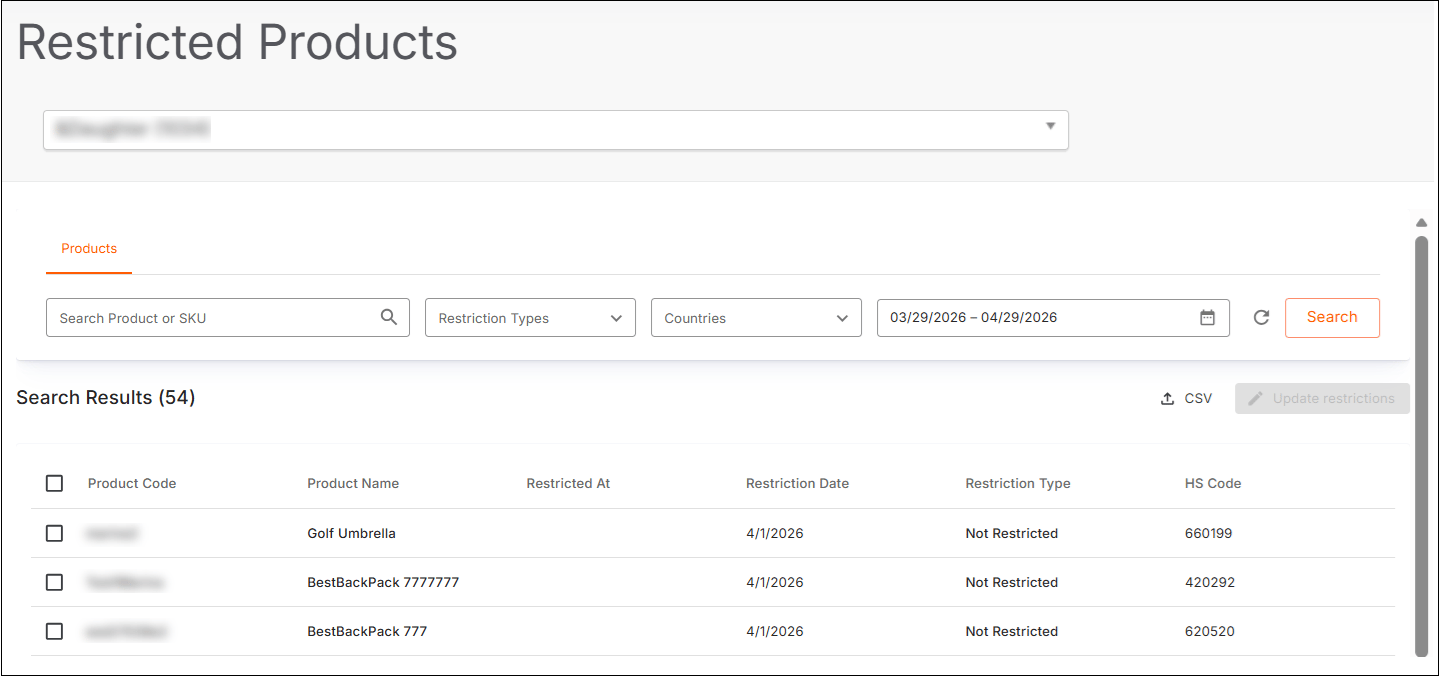
The restricted product **identifier**or **name**screen is displayed:
 3. Search for your restricted product(s):
* **Search Product or SKU** - type part or all of the product name or SKU number.
* **Restriction Types**:
* Not Restricted
* Commercial
* Regulatory
* Dangerous Goods
* **Countries**:
* Click **Select All** to select all countries in the list
* Make individual selections
* **Date range calendar**- select a date range
4. Click **Search**.The results are displayed.
5. Continue with ???.
3. Search for your restricted product(s):
* **Search Product or SKU** - type part or all of the product name or SKU number.
* **Restriction Types**:
* Not Restricted
* Commercial
* Regulatory
* Dangerous Goods
* **Countries**:
* Click **Select All** to select all countries in the list
* Make individual selections
* **Date range calendar**- select a date range
4. Click **Search**.The results are displayed.
5. Continue with ???.