> ## Documentation Index
> Fetch the complete documentation index at: https://enterprise-docs.bglobale.com/llms.txt
> Use this file to discover all available pages before exploring further.
# Merchant Support Portal
The Merchant Support Portal is your hub for submitting cases to technical support, Customer Service, Finance and Pro Support. Signing in allows you to swiftly submit tickets, and specify ticket priorities.
To submit a support case for all technical issues/matters visit the **Global-e Merchant Support Portal.**
**Signing up**
If this is your first time submitting a ticket, you must create a new account.
1. Go to the [Global-e Merchant Support Portal](https://globale-b2b.zendesk.com/hc/en-us/) to access the portal.
2. Click **Sign up.**
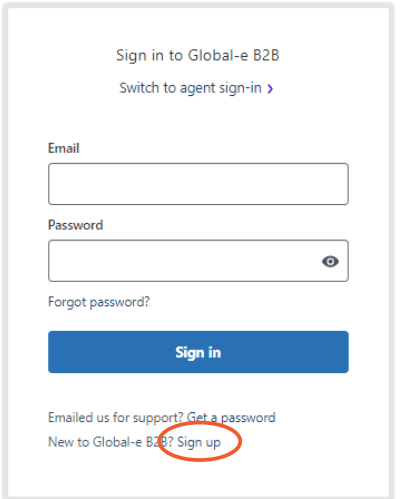 3. Fill in your name and email address.
4. Click **Sign up**.
The password screen opens.
5. Choose a secure password for your account and click **Set password**.
6. Go back to the [Global-e Merchant Support portal](https://globale-b2b.zendesk.com/hc/en-us/) to sign in.
**Signing in**
If you previously submitted a ticket to Global-e support through any channel, there will already be a user account created for you. Follow these steps to sign.
1. Go to the [Global-e Merchant Support Portal](https://globale-b2b.zendesk.com/hc/en-us/) to access the portal.
The Global-e B2B log-in sign-in screen opens.
3. Fill in your name and email address.
4. Click **Sign up**.
The password screen opens.
5. Choose a secure password for your account and click **Set password**.
6. Go back to the [Global-e Merchant Support portal](https://globale-b2b.zendesk.com/hc/en-us/) to sign in.
**Signing in**
If you previously submitted a ticket to Global-e support through any channel, there will already be a user account created for you. Follow these steps to sign.
1. Go to the [Global-e Merchant Support Portal](https://globale-b2b.zendesk.com/hc/en-us/) to access the portal.
The Global-e B2B log-in sign-in screen opens.
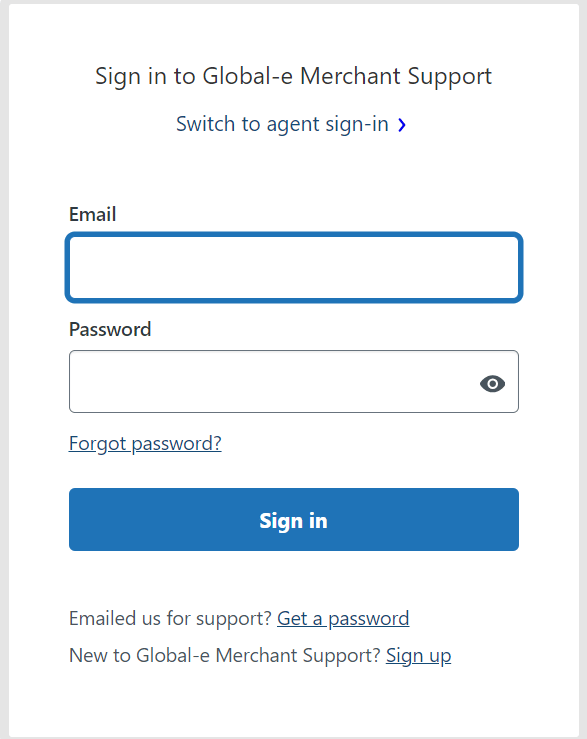 2. Enter your email and password.
3. Click **Sign in**.
2. Enter your email and password.
3. Click **Sign in**.