> ## Documentation Index
> Fetch the complete documentation index at: https://enterprise-docs.bglobale.com/llms.txt
> Use this file to discover all available pages before exploring further.
# Returns Provider Integration Guide
## Introduction
This guide is designed for Returns solution providers operating on Shopify who wish to integrate with Global-e’s returns, refunds and exchange flows for Global-e operated orders.
* **Audience:** Product & Engineering teams at return solution providers, integrating with Global-e over Shopify.
* **Purpose:** Enable seamless connectivity to Global-e’s comprehensive suite of operations for managing returns, exchanges and refunds.
**Why integrate:**
* **Expand market reach** by connecting with Global-e’s global network of Shopify merchants.
* **Drive adoption** by enabling localized, seamless and consistent returns and exchanges experience cross domestic and cross border transactions.
* **Add strategic value** with support for complex cross-border return flows and stronger merchant partnerships.
## Roles and Responsibilities
**Merchant**
* **Defines**merchant policies in the **Return Provider’s admin** (product/order eligibility, return reasons, return windows, refund rules).
* **Defines**shipping options and flat shipping costs in **Global-e admin**.
* Reviews and approves RMAs and refunds when set to manual approval.
**Return Provider**
* Serves as the shopper-facing portal for initiating returns/exchanges.
* Fetches order data from Shopify and verifies whether Global-e operates the order.
* **Manages**merchant return/exchange policies and RMA logic.
* Communicates with Global-e the “Provider Name” identifier which will be sent on the API calls.
* Obtains the merchant’s GUID from the merchant, for each merchant they wish to onboard.
* Calls Global-e APIs to:
* Get return shipping options (Carrier, service, PrePaid return cost)
* Get return documents (label, invoice, shipping instructions, tracking number)
* Get tracking events (for notification and refund automation)
* Delivers RMA documents, shipping labels, and instructions to the shopper.
* Creates exchange orders on Shopify when applicable.
* Supports refund automation based on tracking events (e.g., auto-refunds).
**Global-e**
* Acts as **Merchant of Record** for Global-e-operated orders.
* Assumes full liability for cross-border compliance
* Owns or manages logistics flows
* Issues shopper refunds
* Provides and manages:
* Return addresses, carrier restrictions, and cross-border compliance.
* Shipping options, prepaid labels, and shipping instructions.
* Tracking events.
**Shopify**
* Acts as the central commerce platform linking Merchant, Global-e, and Return Provider.
* Stores and exposes order data for Return Provider validation.
* Handles stock reservations and order creation for exchange flows.
## Before You Start
* Contact GE either by subscribing in our partners portal: [Our Global Ecosystem of Partners - Global-e](https://www.global-e.com/partners-lobby/) or by contacting your merchant’s CSM.
* See this [CheckList](/returns-provider-integration---checklist) document and make sure you fill in everything while working on the integration implementation.
API Referenced in this Document
* [GetReturnShippingOptions](/returns-via-api#getreturnshippingoptions--merchant-to-global-e--388187)
* [GetReturnDocuments](/returns-via-api#getreturndocuments--merchant-to-global-e--388187)
* [GetTrackingEvents](/shipping-methods#-437363)
## High-Level Flows
* [Return flow](/returns-provider-integration-guide#UUID-977719d9-0ac1-2891-37b9-c2148babbad9_N1777295249417)
* [Refund flow](/returns-provider-integration-guide#UUID-977719d9-0ac1-2891-37b9-c2148babbad9_N1777295318960)
* [Even exchanges](/returns-provider-integration-guide#UUID-977719d9-0ac1-2891-37b9-c2148babbad9_N1777295348544)
### Return Flow
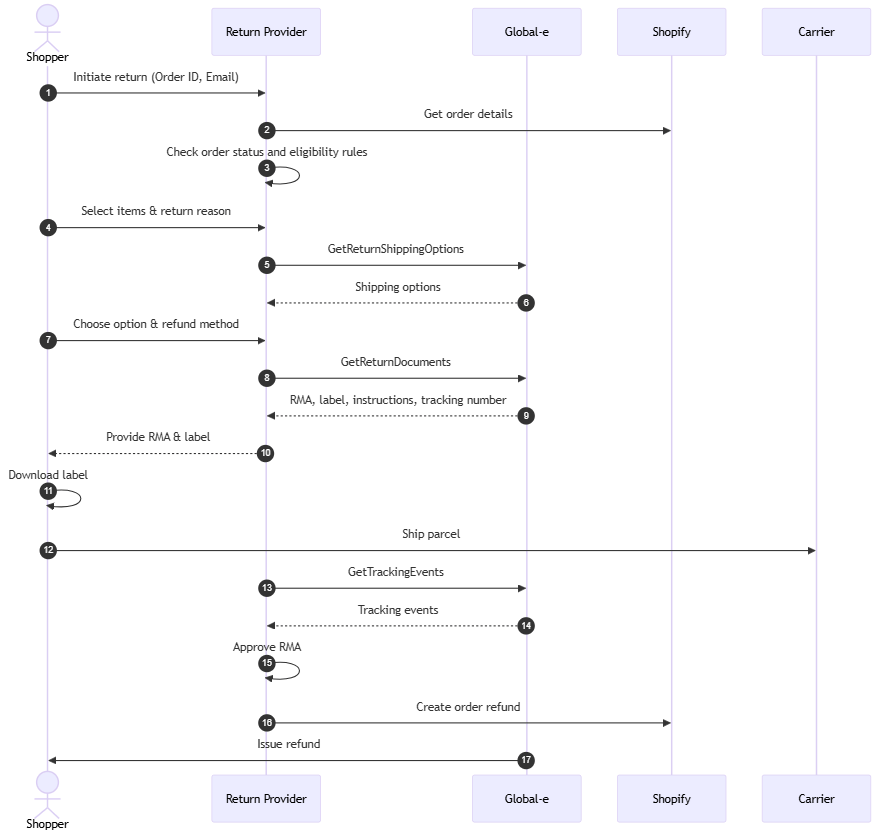 1. **Shopper initiates return**
1. Shopper initiates a return in the returns provider’s portal, usually by entering an **Order ID** and **Email**.
2. The return provider fetches order details from Shopify and validates whether the order is Global-e operated.
3. Global-e order can be recognized by the following attributes:
* `"merchant_of_record_app_id": 5806573`
For testing environment use `“merchant_of_record_app_id": 5806443)`
* If you do not have the `"merchant_of_record_app_id"` attribute, you can fallback to using Global-e OrderID. Each `OrderId`, string, has prefix GE followed by numbers, in the format `GE1234`.
4. The `merchant_of_record_app_id": 5806573` attribute is used to recognize the Global-e order.
Example:
```
"note_attributes": [
{
"name": "GEOrderId",
"value": "GE137255874US"
}
]
```
2. **Shopper chooses item(s) to return**
1. Product return eligibility is managed by:
1. Returns provider: order, product, and RMA eligibility rules.
2. Global-e: carrier and cross-border regulation restrictions (e.g., dangerous goods, import limitations, product restrictions per shipping method).
* Global-e validations occur during the GetReturnShippingOptions API call and may disqualify the return.
* The return provider fetches product prices from Shopify in the presentment currency and displays them in their portal to the shopper in this form.
* Multiple RMA requests are supported per order for different products, but customers cannot create multiple RMAs for the same product.
3. **Shopper provides return reasons:**
1. Return reasons are managed by the return provider
2. Shopper selects item(s) to return and provides reasons in the return provider’s portal.
3. Return provider to send return reason description to Global-e via the GetReturnDocuments API later in the flow.
* Global-e does not support multiple return reasons for items with the same SKU. If a customer returns several units of the same SKU (for example, three t-shirts of the same model), only one return reason applies to the entire group. Assigning different return reasons to individual items within the same SKU is unsupported.
* Multiple items with the same SKU, must be sent as one object in the ReturnedProducts array, with ReturnQuantity > 1.
* When calling GetReturnDocuments API make sure to NOT send the return reason code, just the return reason description.
* If you manage return reasons hierarchically, note that Global-e accepts only one return reason description per item.
4. Shopper selects Return Method
1. The return address is managed and stored by Global-e.
2. Call Global-e’s [GetReturnShippingOptions](/returns-via-api#getreturnshippingoptions--merchant-to-global-e--388187) API to get available shipping carriers, services, and rates.
1. [API authentication](/api-authentication) is done via Merchant GUID- a unique key provided to the Merchant, by Global-e. The Merchant GUID key should be passed in the API header.
2. In order to obtain the Merchant GUID please contact your Merchant
3. Obtain Unique Global-e Order ID: Note: each `OrderId`, string, has prefix `GE`followed by numbers, in the format `GE1234`.
4. Mandatory request fields:
| Field | Description |
| --------------------------------------- | -------------------------------------------------------------------------------------------------------------------------- |
| `OrderId` (string) | Unique Global-e Order ID.Maximum: 100 characters. |
| `ProviderCode` (string) | Provider name or initials that identifies the source of the request.Examples:Loop, Redo, ParcelLab. |
| `CurrencyCode`(string) | CurrencyCode should be passed as per Shopify `order.presentment_currency` code on the order. |
| `ReturnedProducts`(Array of `Products`) | The following fields should be populated:
1. **Shopper initiates return**
1. Shopper initiates a return in the returns provider’s portal, usually by entering an **Order ID** and **Email**.
2. The return provider fetches order details from Shopify and validates whether the order is Global-e operated.
3. Global-e order can be recognized by the following attributes:
* `"merchant_of_record_app_id": 5806573`
For testing environment use `“merchant_of_record_app_id": 5806443)`
* If you do not have the `"merchant_of_record_app_id"` attribute, you can fallback to using Global-e OrderID. Each `OrderId`, string, has prefix GE followed by numbers, in the format `GE1234`.
4. The `merchant_of_record_app_id": 5806573` attribute is used to recognize the Global-e order.
Example:
```
"note_attributes": [
{
"name": "GEOrderId",
"value": "GE137255874US"
}
]
```
2. **Shopper chooses item(s) to return**
1. Product return eligibility is managed by:
1. Returns provider: order, product, and RMA eligibility rules.
2. Global-e: carrier and cross-border regulation restrictions (e.g., dangerous goods, import limitations, product restrictions per shipping method).
* Global-e validations occur during the GetReturnShippingOptions API call and may disqualify the return.
* The return provider fetches product prices from Shopify in the presentment currency and displays them in their portal to the shopper in this form.
* Multiple RMA requests are supported per order for different products, but customers cannot create multiple RMAs for the same product.
3. **Shopper provides return reasons:**
1. Return reasons are managed by the return provider
2. Shopper selects item(s) to return and provides reasons in the return provider’s portal.
3. Return provider to send return reason description to Global-e via the GetReturnDocuments API later in the flow.
* Global-e does not support multiple return reasons for items with the same SKU. If a customer returns several units of the same SKU (for example, three t-shirts of the same model), only one return reason applies to the entire group. Assigning different return reasons to individual items within the same SKU is unsupported.
* Multiple items with the same SKU, must be sent as one object in the ReturnedProducts array, with ReturnQuantity > 1.
* When calling GetReturnDocuments API make sure to NOT send the return reason code, just the return reason description.
* If you manage return reasons hierarchically, note that Global-e accepts only one return reason description per item.
4. Shopper selects Return Method
1. The return address is managed and stored by Global-e.
2. Call Global-e’s [GetReturnShippingOptions](/returns-via-api#getreturnshippingoptions--merchant-to-global-e--388187) API to get available shipping carriers, services, and rates.
1. [API authentication](/api-authentication) is done via Merchant GUID- a unique key provided to the Merchant, by Global-e. The Merchant GUID key should be passed in the API header.
2. In order to obtain the Merchant GUID please contact your Merchant
3. Obtain Unique Global-e Order ID: Note: each `OrderId`, string, has prefix `GE`followed by numbers, in the format `GE1234`.
4. Mandatory request fields:
| Field | Description |
| --------------------------------------- | -------------------------------------------------------------------------------------------------------------------------- |
| `OrderId` (string) | Unique Global-e Order ID.Maximum: 100 characters. |
| `ProviderCode` (string) | Provider name or initials that identifies the source of the request.Examples:Loop, Redo, ParcelLab. |
| `CurrencyCode`(string) | CurrencyCode should be passed as per Shopify `order.presentment_currency` code on the order. |
| `ReturnedProducts`(Array of `Products`) | The following fields should be populated:
`CartItemID`→ corresponds to Shopify field LineItemId
`ReturnQuantity` |
3. Shopper views available shipping options with corresponding rates and selects one.
* Shipping options and prepaid shipping rates are managed by Global-e.
* Global-e returns multiple shipping options as configured by the merchant (e.g., express, standard, self-postage).
* If the return provider supports only one shipping method, they must inform the merchant and ensure the correct return method is selected for each shipping lane.
* Carrier restrictions are managed and validated by Global-e (e.g., dangerous goods, import limitations, product restrictions per shipping method).
* Returns can only be done from the country where the order was initially delivered.
5. **Shopper indicates refund method**
1. Refund can be issued as:
1. Original payment method - initiated by the returns provider and issued by Global-e
2. Shopify Gift Card - managed by the returns provider
2. More information on refunds is available in the refund flow section below.
6. **Shopper confirms return**
1. Call Global-e’s [GetReturnDocuments](/returns-via-api#getreturndocuments--merchant-to-global-e--388187) API to initiate an RMA and get return documents.
1. Mandatory fields:
| Field | Description |
| ---------------------------------------------------------------- | -------------------------------------------------------------------------------------------------------------------------------------------------------------------------- |
| `OrderId`(string) | Unique Global-e Order ID or Merchant Order ID.Maximum: 100 characters. |
| `ProviderCode`(string) | Provider name or initials that identifies the source of the request.Examples:Loop, Redo, ParcelLab |
| `ReturnedProducts` (Array of [ReturnedProduct](/return-methods)) | An array containing the returned products' details.
MerchantReturnReasonDescription
`CartItemID` - corresponds to Shopify field LineItemId
`ReturnQuantity` |
2. The API shall return the following:
* Global-e RMA number
* Return shipping label
* Shipping instructions
* Commercial Invoice - Optional
* Tracking Details - an array which includes the **TrackingNumber** - this number should be saved in order to later use the GetTrackingEvents API.
2. The return provider creates the return in Shopify, including the ReturnShippingFee, and provides the return label and instructions to the shopper.
* Shopper is sent a return confirmation with the return documents.
When migrating from Global-e’s returns solution to a 3rd party returns provider, it’s important to note that Global-e can manage all returns-related customer emails (such as RMA notifications). If the third-party provider will handle these communications instead, the email notifications on Global-e’s side must be disabled to prevent duplicate messages.
7. **Get label and ship product back**
1. Shopper downloads label and instructions.
2. Shopper sends parcel.
3. Optional: Global-e provides a tracking events API for its carriers:
1. call [GetTrackingEvents](/shipping-methods#-437363) API for tracking updates.
### Refund Flow
This section defines how refunds are initiated, communicated, and processed between the **Return Provider**, \*\*Global-\*\*e, and **Shopify**after a refund is approved.
**Refund Initiation**
Although the refund is initiated in Shopify, the actual payment to the shopper is done by Global-e. In order to make sure that we won’t have double refunds or incorrect refunds, it is very important to follow the guidelines below which defines the proper way to initiate the refund via Shopify.
**Handling Return Shipping Fees**
1. When creating a refund in Shopify, the return provider, should specify what is the deducted shipping fee for the return by declaring the prepaid amount in presentment\_currency in the Shopify Native ReturnShippingFee return property.
2. Shipping fees are managed by Global-e and available via the [GetReturnShippingOptions](/returns-via-api#getreturnshippingoptions--merchant-to-global-e--388187)API.
3. Shopify will deduct the shipping cost from the refund amount, Global-e will get this information from Shopify and will refund the shopper with the correct amount.
4. If the return provider does not specify the shipping fee, GE will refund the shopper with the full amount which was sent from Shopify and will charge the shipping fee from merchant.
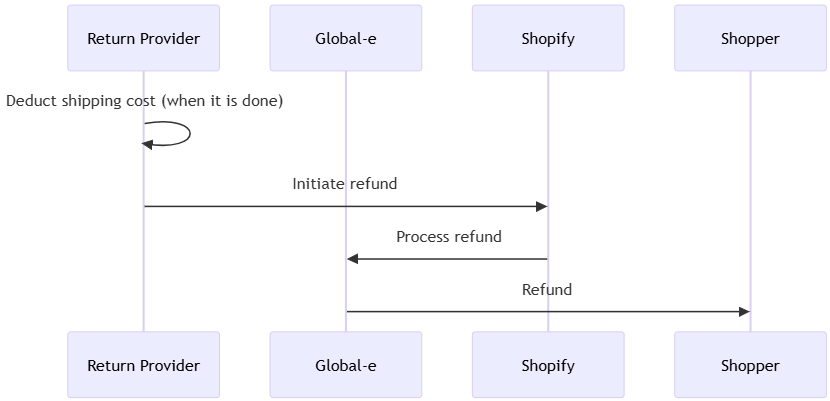 5. Refund logic:
* The Return Provider must **create a return** and specify the return shipping fee.
* The Return Provider needs to refund the return and call the Shopify API: [returnRefund](https://shopify.dev/docs/api/admin-graphql/latest/mutations/returnrefund) to connect the refund to the return.
**Refund Execution**
* Global-e receives the refund request from Shopify (via webhook).
* Global-e checks if the refund amount includes the return shipping fee deduction.
* The relevant amount is refunded to the shopper by **Global-e** and details are logged.
* **Shopify’s declared return shipping fee determines what the shopper pays.**
Global-e’s shipping flat fee represents the agreed-upon amount that must always be fully accounted for, either by the shopper, the merchant, or a combination of both.
* During reconciliation, Global-e ensures the flat fee is fully covered:
* If Shopify undercharges (Return provider declares a lower fee), the merchant is fully responsible for covering the remaining balance between Shopify’s declared fee and the Global-e shipping flat fee.
* If Shopify overcharges (Return provider declares a higher fee), the merchant receives the difference between the higher shopper charge and the Global-e shipping flat fee.
In other words, the merchant remains fully responsible for any financial difference between Shopify’s declared return shipping fee and the Global-e shipping flat fee they configured.
**Reconciliation and Reporting**
1. Details about refund, items, and shipping fees are included in finance/merchant reconciliation.
2. Refund status and data is synchronized between Shopify and Global-e for full order lifecycle tracking.
* The Return Provider should include all adjustments (shipping, duties, etc.) in the corresponding fields in Shopify.
* The **net refund amount** sent to Global-e from Shopify must reflect any deductions or additional charges.
* Global-e will handle financial reconciliation with the merchant for these adjustments.
**Alternative Refund Methods**
If the shopper selects a**Shopify Gift Card** instead of an original payment refund:
* The refund is processed entirely within Shopify by the Return Provider.
* The Return Provider should record the transaction internally and update the RMA status to "Refunded (Gift Card)".
* Global-e **does not** support currently “**Shopify Store Credit**”. Shopper will not be able to use this type of payment.
* When a refund is made to a **Gift Card**, Global-e cannot see that transaction. To avoid double refunds, ensure that **no “Auto Refund” automation is enabled on Global-e side**.
**Refund Automation and Tracking**
* Refund automation enables**seamless refund initiation** based on parcel tracking events or internal system rules.
* Automation can be owned by either by Global-e or by the return provider.
* The **Return Provider**can monitor tracking statuses via the [GetTrackingEvents](/shipping-methods#-437363) API to trigger the refund programmatically.
**Automation Ownership**
There are two possible automation configurations:
1. **Refund automation managed by Global-e**
* Refunds are triggered automatically once the tracking event matches the configured rule (e.g., *in transit or delivered*).
* The Return Provider **should not** issue a separate refund to avoid duplication.
2. **Refund automation managed by the Return Provider**
* Refunds are triggered within the provider’s system.
* In this case, **Global-e’s automation must be turned off** to prevent double refunds.
* To disable automation on Global-e’s side, the merchant must **submit a support ticket** to Global-e.
**Tracking Events API**
* The **Return Provider** can monitor parcel progress via the [GetTrackingEvents](/shipping-methods#-437363) API.
* The TrackingNumber is received as part of the response of the GetReturnDocuments API and should be saved by the return provider in order to be used in calling the GetTrackingEvents API.
| Parameter Name | Type | Description | Mandatory |
| ----------------- | --------------- | --------------------------------------------------------------------------- | ----------------------------------------------------------- |
| `OrderIds` | List of Strings | List of Global‑e Order IDs. Up to 100 in each request.Max length:100 chars. | One of either `OrderIds` or `TrackingNumbers` is mandatory. |
| `TrackingNumbers` | List of Strings | List of Global-e tracking numbers. Up to 100 in each request. | Conditional |
| `Type` | String | The shipment direction: **inbound** | Yes |
* Supported tracking states include *in transit, delivered, returned to sender*, etc.
* Merchants can configure automated refund triggers based on these statuses.
**Double Refund Prevention**
If both Global-e and the Return Provider (or the merchant directly in Shopify) trigger refunds, a **double refund** may occur.
To prevent this:
* Refund automation should exist **only on one side** (Global-e or Return Provider).
* Coordination between Global-e, the Return Provider, and the merchant is required before enabling automated refunds.
**Notifications and Emails**
Refund and RMA-related email notifications can be sent either by Global-e or by the Return Provider, depending on merchant preference.
**Global-e Notifications**
* Global-e can automatically send RMA confirmation emails to shoppers.
* If the merchant prefers Global-e to send these, no additional configuration is required.
**Return Provider Notifications**
* If the Return Provider manages customer communication, to avoid duplicate notifications, **Global-e’s email notifications must be disabled**.
**Disabling Global-e Notifications**
To disable email notifications on Global-e’s side:
1. The merchant (or partner) must open a **support ticket** with Global-e.
2. **Specify** which notifications should be disabled (refund configuration, RMA confirmation, etc).
3. Global-e will update the merchant configuration accordingly.
### Even Exchanges
**Supported Exchange Scenario**
Global-e supports **even exchanges (Variant-exchange) only**:
* No refunds or additional charges are allowed.
* Shipping fees cannot be collected or refunded.
* All shipping costs and any duty/tax adjustments are absorbed by the merchant as part of the service.
**Exchange Flow**
5. Refund logic:
* The Return Provider must **create a return** and specify the return shipping fee.
* The Return Provider needs to refund the return and call the Shopify API: [returnRefund](https://shopify.dev/docs/api/admin-graphql/latest/mutations/returnrefund) to connect the refund to the return.
**Refund Execution**
* Global-e receives the refund request from Shopify (via webhook).
* Global-e checks if the refund amount includes the return shipping fee deduction.
* The relevant amount is refunded to the shopper by **Global-e** and details are logged.
* **Shopify’s declared return shipping fee determines what the shopper pays.**
Global-e’s shipping flat fee represents the agreed-upon amount that must always be fully accounted for, either by the shopper, the merchant, or a combination of both.
* During reconciliation, Global-e ensures the flat fee is fully covered:
* If Shopify undercharges (Return provider declares a lower fee), the merchant is fully responsible for covering the remaining balance between Shopify’s declared fee and the Global-e shipping flat fee.
* If Shopify overcharges (Return provider declares a higher fee), the merchant receives the difference between the higher shopper charge and the Global-e shipping flat fee.
In other words, the merchant remains fully responsible for any financial difference between Shopify’s declared return shipping fee and the Global-e shipping flat fee they configured.
**Reconciliation and Reporting**
1. Details about refund, items, and shipping fees are included in finance/merchant reconciliation.
2. Refund status and data is synchronized between Shopify and Global-e for full order lifecycle tracking.
* The Return Provider should include all adjustments (shipping, duties, etc.) in the corresponding fields in Shopify.
* The **net refund amount** sent to Global-e from Shopify must reflect any deductions or additional charges.
* Global-e will handle financial reconciliation with the merchant for these adjustments.
**Alternative Refund Methods**
If the shopper selects a**Shopify Gift Card** instead of an original payment refund:
* The refund is processed entirely within Shopify by the Return Provider.
* The Return Provider should record the transaction internally and update the RMA status to "Refunded (Gift Card)".
* Global-e **does not** support currently “**Shopify Store Credit**”. Shopper will not be able to use this type of payment.
* When a refund is made to a **Gift Card**, Global-e cannot see that transaction. To avoid double refunds, ensure that **no “Auto Refund” automation is enabled on Global-e side**.
**Refund Automation and Tracking**
* Refund automation enables**seamless refund initiation** based on parcel tracking events or internal system rules.
* Automation can be owned by either by Global-e or by the return provider.
* The **Return Provider**can monitor tracking statuses via the [GetTrackingEvents](/shipping-methods#-437363) API to trigger the refund programmatically.
**Automation Ownership**
There are two possible automation configurations:
1. **Refund automation managed by Global-e**
* Refunds are triggered automatically once the tracking event matches the configured rule (e.g., *in transit or delivered*).
* The Return Provider **should not** issue a separate refund to avoid duplication.
2. **Refund automation managed by the Return Provider**
* Refunds are triggered within the provider’s system.
* In this case, **Global-e’s automation must be turned off** to prevent double refunds.
* To disable automation on Global-e’s side, the merchant must **submit a support ticket** to Global-e.
**Tracking Events API**
* The **Return Provider** can monitor parcel progress via the [GetTrackingEvents](/shipping-methods#-437363) API.
* The TrackingNumber is received as part of the response of the GetReturnDocuments API and should be saved by the return provider in order to be used in calling the GetTrackingEvents API.
| Parameter Name | Type | Description | Mandatory |
| ----------------- | --------------- | --------------------------------------------------------------------------- | ----------------------------------------------------------- |
| `OrderIds` | List of Strings | List of Global‑e Order IDs. Up to 100 in each request.Max length:100 chars. | One of either `OrderIds` or `TrackingNumbers` is mandatory. |
| `TrackingNumbers` | List of Strings | List of Global-e tracking numbers. Up to 100 in each request. | Conditional |
| `Type` | String | The shipment direction: **inbound** | Yes |
* Supported tracking states include *in transit, delivered, returned to sender*, etc.
* Merchants can configure automated refund triggers based on these statuses.
**Double Refund Prevention**
If both Global-e and the Return Provider (or the merchant directly in Shopify) trigger refunds, a **double refund** may occur.
To prevent this:
* Refund automation should exist **only on one side** (Global-e or Return Provider).
* Coordination between Global-e, the Return Provider, and the merchant is required before enabling automated refunds.
**Notifications and Emails**
Refund and RMA-related email notifications can be sent either by Global-e or by the Return Provider, depending on merchant preference.
**Global-e Notifications**
* Global-e can automatically send RMA confirmation emails to shoppers.
* If the merchant prefers Global-e to send these, no additional configuration is required.
**Return Provider Notifications**
* If the Return Provider manages customer communication, to avoid duplicate notifications, **Global-e’s email notifications must be disabled**.
**Disabling Global-e Notifications**
To disable email notifications on Global-e’s side:
1. The merchant (or partner) must open a **support ticket** with Global-e.
2. **Specify** which notifications should be disabled (refund configuration, RMA confirmation, etc).
3. Global-e will update the merchant configuration accordingly.
### Even Exchanges
**Supported Exchange Scenario**
Global-e supports **even exchanges (Variant-exchange) only**:
* No refunds or additional charges are allowed.
* Shipping fees cannot be collected or refunded.
* All shipping costs and any duty/tax adjustments are absorbed by the merchant as part of the service.
**Exchange Flow**
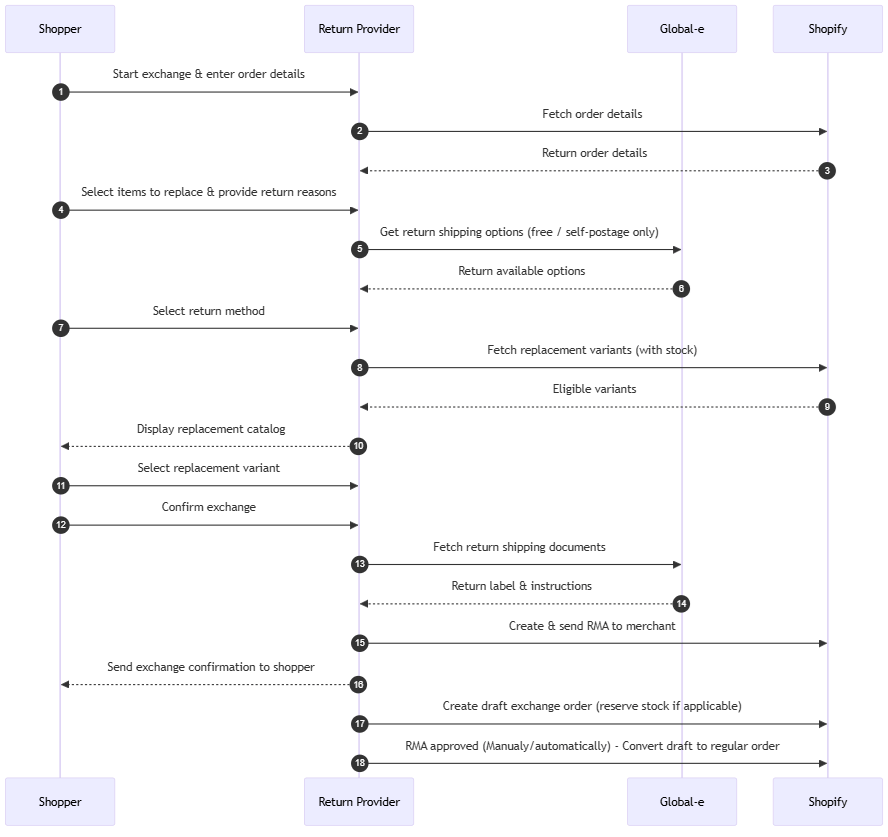 1. **Shopper initiates an exchange**
1. Shopper enters order details in the return provider’s portal.
2. After fetching order details from Shopify, the return provider validates whether the order is **Global-e operated.**
* `"merchant_of_record_app_id": 5806573`
For testing environment use `“merchant_of_record_app_id": 5806443)`
* If you do not have the `"merchant_of_record_app_id"` attribute, you can fallback to using Global-e OrderID. Each `OrderId`, string, has prefix `GE` followed by numbers, in the format `GE1234`.
2. **Shopper selects items to be replaced**
* Shopper selects the items to be replaced and provides return reasons in the return provider’s portal.
3. **Return shipping options**
* The return provider calls [GetReturnShippingOptions](/returns-via-api#getreturnshippingoptions--merchant-to-global-e--388187) API to fetch available shipping options (free shipping / self postage only).
* Shopper selects the return method.
* The return provider provides the return label and shipping documents.
For prepaid shipping rates, the shopper will not be charged for return shipping; it will be settled by the merchant as part of the Global-e merchant reconciliation process.
4. **Shopper selects replacement items**
* The return provider queries Shopify to fetch the available replacement variants (ensuring stock availability).
* The return provider displays the eligible replacement catalog to the shopper.
* Shopper selects the desired replacement item/variant.
* The shipping option for the exchange order will be assigned by Global-e based on the merchant’s preference.
The shopper will not be charged this rate; it will be settled by the merchant as part of the Global-e merchant reconciliation process.
5. **Shopper confirm exchange**
* Shopper confirms the exchange in the return provider’s portal.
* The return provider calls [GetReturnsDocument API](/returns-via-api#getreturndocuments--merchant-to-global-e--388187) to fetch the return shipping documents.
* The return provider creates the RMA and provides the return label and instructions to the shopper.
* Shopper is sent an exchange confirmation with the return documents (this notification can also be triggered directly by Global-e and is configurable).
6. **Draft Exchange Order creation in Shopify**
* The return provider creates an exchange draft order in Shopify and reserves stock if applicable.
* Shopify exchange order recognition by Global-e:
* Order **must not have** `"ReplacementForOrder"` note. This field will be filled by Global-e after creating the replacement order.
* The order **must include** `OriginalShopifyOrderId` in `note_attributes`:
```
"note_attributes": [
{
"name": "OriginalShopifyOrderId",
"value": "123456789"
}
]
```
7. **RMA approval**
* RMA approval logic for exchange orders is managed by the return provider.
* On the return provider’s side, RMA can be approved manually (the merchant reviews and approves), or automatically in specified cases (e.g., low-value returns), or using tracking event logic.
* Global-e offers a [tracking events API](/shipping-methods#-437363) for its carriers to support tracking-events-based RMA approval.
* Once the RMA is approved, the draft exchange order needs to be converted to a regular Shopify order by the return provider.
8. **Exchange order processing**
* The Shopify exchange order is recognized and processed as a Global-e replacement order.
* Once the Global-e replacement order is created, Global-e updates the `ReplacementForOrder` field on the replacement order.
* Replacement order is fulfilled and shipped using the recommended shipping logic.
* Before integrating, contact your Global-e representative to ensure the merchant is properly configured in Global-e Admin.
* **Shipping recommendations**
* **Incoming (return):** for exchanges ONLY free shipping / self-postage options should be available.
* **Outgoing (replacement):** The merchant can reuse original shipping line or use the standard shipping method.
* **Merchant responsibility**
* Return providers must inform merchants that Global-e supports only even-value exchanges with free shipping, with any shipping or duty/tax costs covered by the merchant.
1. **Shopper initiates an exchange**
1. Shopper enters order details in the return provider’s portal.
2. After fetching order details from Shopify, the return provider validates whether the order is **Global-e operated.**
* `"merchant_of_record_app_id": 5806573`
For testing environment use `“merchant_of_record_app_id": 5806443)`
* If you do not have the `"merchant_of_record_app_id"` attribute, you can fallback to using Global-e OrderID. Each `OrderId`, string, has prefix `GE` followed by numbers, in the format `GE1234`.
2. **Shopper selects items to be replaced**
* Shopper selects the items to be replaced and provides return reasons in the return provider’s portal.
3. **Return shipping options**
* The return provider calls [GetReturnShippingOptions](/returns-via-api#getreturnshippingoptions--merchant-to-global-e--388187) API to fetch available shipping options (free shipping / self postage only).
* Shopper selects the return method.
* The return provider provides the return label and shipping documents.
For prepaid shipping rates, the shopper will not be charged for return shipping; it will be settled by the merchant as part of the Global-e merchant reconciliation process.
4. **Shopper selects replacement items**
* The return provider queries Shopify to fetch the available replacement variants (ensuring stock availability).
* The return provider displays the eligible replacement catalog to the shopper.
* Shopper selects the desired replacement item/variant.
* The shipping option for the exchange order will be assigned by Global-e based on the merchant’s preference.
The shopper will not be charged this rate; it will be settled by the merchant as part of the Global-e merchant reconciliation process.
5. **Shopper confirm exchange**
* Shopper confirms the exchange in the return provider’s portal.
* The return provider calls [GetReturnsDocument API](/returns-via-api#getreturndocuments--merchant-to-global-e--388187) to fetch the return shipping documents.
* The return provider creates the RMA and provides the return label and instructions to the shopper.
* Shopper is sent an exchange confirmation with the return documents (this notification can also be triggered directly by Global-e and is configurable).
6. **Draft Exchange Order creation in Shopify**
* The return provider creates an exchange draft order in Shopify and reserves stock if applicable.
* Shopify exchange order recognition by Global-e:
* Order **must not have** `"ReplacementForOrder"` note. This field will be filled by Global-e after creating the replacement order.
* The order **must include** `OriginalShopifyOrderId` in `note_attributes`:
```
"note_attributes": [
{
"name": "OriginalShopifyOrderId",
"value": "123456789"
}
]
```
7. **RMA approval**
* RMA approval logic for exchange orders is managed by the return provider.
* On the return provider’s side, RMA can be approved manually (the merchant reviews and approves), or automatically in specified cases (e.g., low-value returns), or using tracking event logic.
* Global-e offers a [tracking events API](/shipping-methods#-437363) for its carriers to support tracking-events-based RMA approval.
* Once the RMA is approved, the draft exchange order needs to be converted to a regular Shopify order by the return provider.
8. **Exchange order processing**
* The Shopify exchange order is recognized and processed as a Global-e replacement order.
* Once the Global-e replacement order is created, Global-e updates the `ReplacementForOrder` field on the replacement order.
* Replacement order is fulfilled and shipped using the recommended shipping logic.
* Before integrating, contact your Global-e representative to ensure the merchant is properly configured in Global-e Admin.
* **Shipping recommendations**
* **Incoming (return):** for exchanges ONLY free shipping / self-postage options should be available.
* **Outgoing (replacement):** The merchant can reuse original shipping line or use the standard shipping method.
* **Merchant responsibility**
* Return providers must inform merchants that Global-e supports only even-value exchanges with free shipping, with any shipping or duty/tax costs covered by the merchant.