

- JSON Web Token (JWT) Authentication - Unique key generated to the Merchant, based on username and password provided by Global-e (preferred method).
- Merchant GUID - Unique key provided to the Merchant, by Global-e.
UserName header and the Authorization header, including the token retrieved via the GetAuthenticationToken API using merchant-specific credentials (provided by Global‑e).
JWT Authentication
The JSON Web Token (JWT) authentication method is used by merchants authenticating their APIs sent to Global-e APIs. It is possible to configure JWT authentication for a specific API, while other APIs will use merchant GUID authentication.To Create the JWT Token
Prerequisites The following setup should be done before applying to a JWT token:- Global-e adds a user for the merchant in Global-e DB. The name of the user is identified by Global-e.
- Global-e confirms with the merchant the name created.
- The Merchant generates a key using Postman / Swagger (not in the Production environment) using the Authentication Service - CreateUpdateUser API.
- The Merchant implements the GetToken API to renew the token. If expired - Global-e API returns an error.
- Send user name + password to “/Authentication/GetAuthenticationToken” API. The username and password are provided to the merchant by GE.
- Receive JWT token. The JWT token can be cached and reused by the merchant until it expires (15 minutes is the default TTL).
- Add the returned JWT token to the HTTP header in every API call. **Note:**The merchant GUID must still be specified in the request URL, in addition to the JWT token in the HTTP header.
GetAuthenticationToken API
Use the GetAuthenticationToken API to obtain a JSON web token (JWT). Send a username and password that are obtained by Global-e and receive a JWT token. The returned token and the username are sent as part of the API request, in the HTTP request header. With that, the MerchantGUID must still be specified in the request URL, in addition to the JWT token in the HTTP header Method/URLGetAuthenticationToken API as in the following URL:
https://{server_name}/Authentication/GetAuthenticationToken
| Parameter | Type | Description | Mandatory |
|---|---|---|---|
Reason | String | Text that optionally describes the reason for Success status | |
Success | Boolean | Indicates if the API call was successful. Success property value may be only TRUE. Otherwise, an ErrorInfo is returned. | |
Token | String | JWT encoded token. | |
TTLInMinutes | Int | The Token expiry time in minutes. |
By default, the token expires within 15 minutes unless you specify that the token should be valid for longer.
Using the JWT Key in the Header
Once the token has been generated, call the API of choice using the relevant credentials in the header. Examplekey= ”Authorization” | value = "my_jwt_token" Key= ”UserName”| value = "userName"
Example of JWT in Header
Interaction Diagram
The diagram below shows the interaction between the Merchant code, the Global‑e API code, and the authentication service.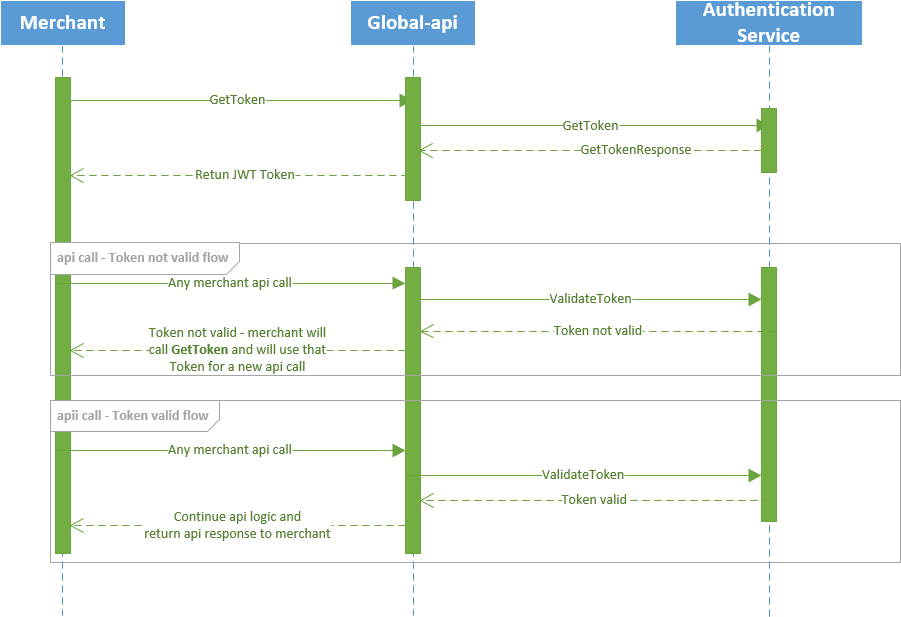
MerchantGUID Authentication
To implement API calls with Global-e themerchantGUID provided by Global-e must be included in the call, to ensure successful authentication.
For the authentication, make sure to include your Merchant GUID as part of each call body parameters or as part of the header, so that Global-e can verify your identity. Make sure to use the appropriate merchantGUID, depending on the Global‑e integration environment used for development or production purposes. See Global-e Environments.
For each endpoint, perform the following steps:
- Add the MerchantGUID in the request header as illustrated below. Make sure to use the appropriate merchantGUID, depending on the Global‑e integration environment used, development or production.
- Make sure to implement the API on the server side (rather than calling it from the client side). Alternatively, implement it outside of the frontend layer to avoid exposing the merchant GUID publicly.