

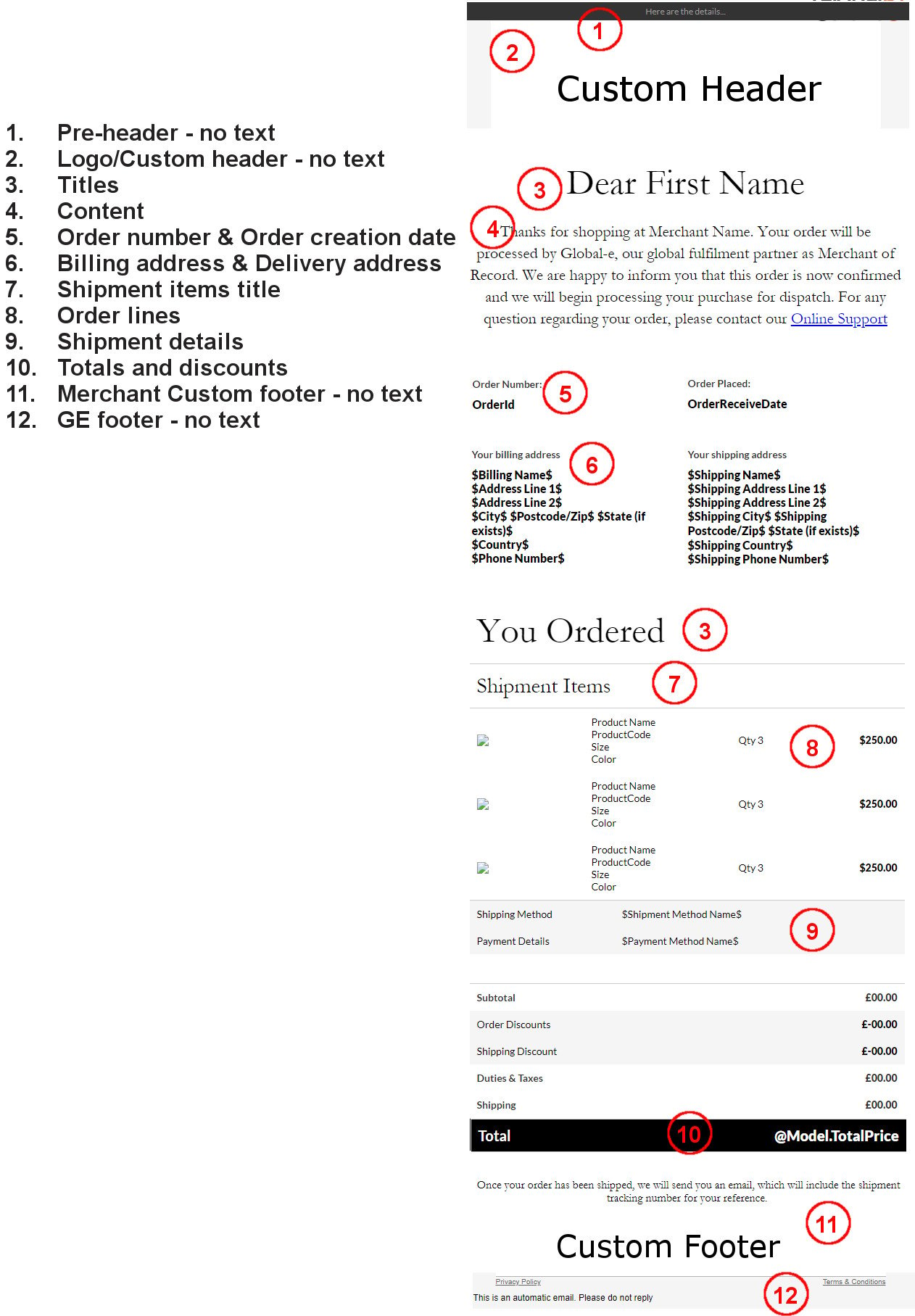
- Pre-header
- Custom header
- Logo
-
Fonts
Titles
Content
Order number and creation date
Delivery address and billing addressShipment items title
Order lines
Shipment details
Totals and discounts - Merchant custom footer
- Global‑e footer
Pre-Header
The pre-header displays a general notification that can change, depending on the email type. For example:
Custom Header
You can provide a custom header to be implemented at the top of the Global-e emails. The same header can be used for all languages or a different header can be used for each language. Please note that the header content cannot be different per country. If several languages are required, the header should be provided in all the desired languages.- The language is set according to the checkout language selected by the customer.
- Provide the header in HTML format.
- By default, this section is not used.
- Merchants are to provide URLs of all icons/pictures from the merchant’s server.
- Merchants are to provide files of all icons and pictures and Global-e will upload them to the Global-e server.
Logo
The Merchant logo is displayed at the top of our emails. If a custom header is displayed which includes the logo, this logo can be hidden.Fonts
Global‑e can customize the fonts in the following sections:- Titles
- Content
- Order number and order creation date
- Billing address and delivery address
- Shipment items title
- Order lines
- Shipment details
- Totals and discounts
- The font type
- The font colour
- The font weight
- Arial
- Courier New
- Georgia
- Tahoma
- Times New Roman
- Trebuchet MS
- Verdana
Titles
This section contains the titles displayed in our emails: Dear Customer You OrderedContent
This section includes the body of the email: Thanks for shopping at [MerchantName]. Your order will be processed by Global-e as a merchant of record for this transaction. We are happy to inform you that this order is now confirmed and we will begin processing your purchase for dispatch. Questions? Online Support.Order Number and Order Creation Date
This section details the order ID and date created:| Order Number: | Order Placed: |
|---|---|
| OrderID | 15.11.23 |
Billing Address & Delivery Address
This section details the billing and shipping address for the order:| Your billing address****CustomerName Street House # City, Zip Country Phone #Your shipping addressCustomerName Street House # City, Zip Country Phone # | Your billing address****CustomerName Street House # City, Zip Country Phone #Your shipping addressCustomerName Street House # City, Zip Country Phone # | Your billing address | CustomerName Street House # City, Zip Country Phone # | Your shipping address | CustomerName Street House # City, Zip Country Phone # |
|---|---|---|---|---|---|
| Your billing address****CustomerName Street House # City, Zip Country Phone #Your shipping addressCustomerName Street House # City, Zip Country Phone # | Your billing address | CustomerName Street House # City, Zip Country Phone # | Your shipping address | CustomerName Street House # City, Zip Country Phone # | |
| Your billing address | |||||
| CustomerName Street House # City, Zip Country Phone # | |||||
| Your shipping address | |||||
| CustomerName Street House # City, Zip Country Phone # |
Shipment Items Title
This section includes the title of the shipment items: Shipment ItemsOrder Lines
This section includes the product details:| Product SKU | Qty 1 | Product price |
|---|
Shipment Details
This section includes the shipping method and payment method chosen:| Shipping Method | Express Courier (Air) |
|---|---|
| Payment Details | Visa |
Totals and Discounts
This section includes the total cost of the order:| Subtotal | $111.11 |
|---|---|
| Duties & Taxes | $111.11 |
| Shipping | $11.11 |
Merchant Custom Footer
The Merchant can provide a custom footer to be added to the Global-e emails. The same footer can be used for all languages or a different footer can be used for each language. Please note that the footer content cannot be different per country. If several languages are required, the footer should be provided in all the desired languages.- The language is set according to the checkout languages chosen by the customer.
- Provide the footer in HTML format.
- By default, this section is not used.
- Merchants are to provide URLs of all icons/pictures from the merchant’s server.
- Merchants are to provide files of all icons and pictures and Global-e will upload them to the Global-e server.
Global‑e Footer
The Global‑e footer is displayed by default at the bottom of all emails. This footer can be disabled per configuration.