

- Example 1: Single parcel order with all items in stock
- Example 2: Multi-parcel order with all items in stock
- Example 3: Split multi-parcel order with all items in stock
- Example 4: Multi-parcel order with some items out of stock
- Example 5: Split multi-parcel order with some items out of stock
- Example 6: Split multi-parcel order with some items out of stock with exceptions
- Example 7:
- Example 8:
- Example 9:
- Example 10:
- Example 11:
Example 1: Single Parcel Order with All Items in Stock
Description
This example describes a single parcel order when all items are in stock. In this example the customer has purchased the following products:- SKU 1 – quantity 1
- SKU 2 – quantity 1
- SKU 3 – quantity 1
Shipping Scenario
The following describes the shipping scenario for this example:
- All the items are sent in one parcel, P1.
- The order is marked as completed and is dispatched to the customer on arrival at the Global-e hub.
Example 2: Multi-Parcel Order with All Items in Stock
Description
This example describes a multi-parcel order when all items are in stock. In this example the customer has purchased the following products:- SKU 1 – quantity 1
- SKU 2 – quantity 1
- SKU 3 – quantity 1
Shipping Scenario
The following describes the shipping scenario for this example:- All the items are sent in one parcel, P1 and P2.
- The order is marked as completed and is dispatched to the customer on arrival at the Global-e hub.

Example 3: Split Multi-Parcel Order with All Items in Stock
Description
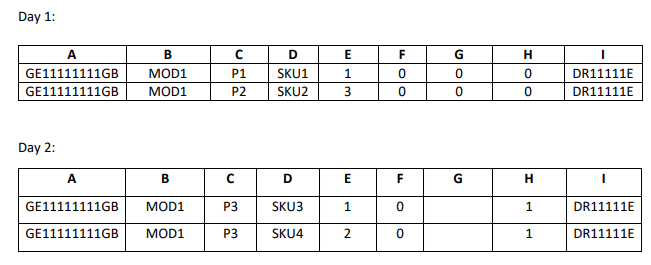
This example describes a split multi-parcel order when all items are in stock. In this example the customer has purchased the following products:- SKU 1 – quantity 1
- SKU 2 – quantity 3
- SKU 3 – quantity 1
- SKU 4 - quantity 2
Shipping Scenario
The following describes the shipping scenario for this example:- Two parcels, P1 and P2, arrive on the first day and the order is marked as incomplete.
- The Global-e hub processes the parcels and puts them in Holding Area 2.
- The following day, parcel P3 arrives. The parcel is processed, the hub operator is notified and collects the on-hold parcels.
- All three parcels are dispatched to the customer.
Example 4: Multi-Parcel Order with Some Items out of Stock
Description
This example describes a multi-parcel order when some items are out of stock. In this example the customer has purchased the following products:- SKU 1 – quantity 1
- SKU 2 – quantity 3
Shipping Scenario
The following describes the shipping scenario for this example:- Two parcels, P1 and P2, arrive and the order is flagged as completed.
-
Product SKU 2 shows that only two out of three items were shipped. However, because the order is flagged as completed, the manifest processor treats the third item of SKU 2 as Stock Not Available (SNA):
- The customer is notified and refunded.
- The export documentation is amended.
- The parcels are dispatched to the customer on the same day.

Example 5: Split Multi-Parcel Order with Some Items out of Stock
Description
This example describes a split multi-parcel order when some items are out of stock. In this example the customer has purchased the following products:- SKU 1 – quantity 1
- SKU 2 – quantity 3
Shipping Scenario
The following describes the shipping scenario for this example: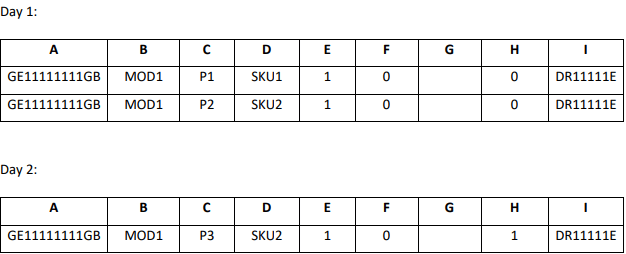
- Two parcels, P1 and P2, arrive and the order is flagged as incomplete.
- Product SKU2 shows that only 1 item out of the ordered 3 are shipped.
- The Global-e hub processes the parcels and puts them in Holding Area 3.
-
The following day parcel P3 arrives, and the order is flagged as completed, however, product SKU2 only shows 1 additional item.
This parcel is processed and:
- The customer is notified and refunded for one item of SKU2 which is out of stock.
- The export documentation is amended accordingly.
- The hub operator is notified of additional parcels in the holding area and collects the on-hold parcels. All three parcels are dispatched to the customer.
Example 6: Split Multi-Parcel Order with Some Items out of Stock with Exceptions
Description
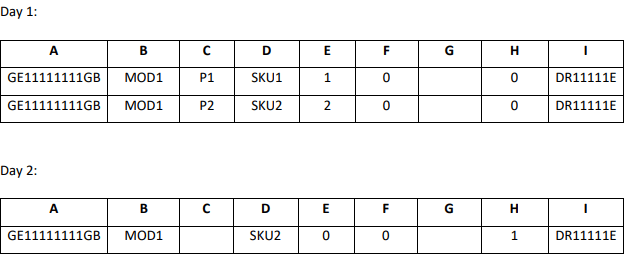
This example describes a split multi-parcel order when some items are out of stock, with some exceptions. In this example the last item is SNA indefinitely. In this example the customer has purchased the following products:- SKU 1 – quantity 1
- SKU 2 – quantity 3
Shipping Scenario
The following describes the shipping scenario for this example:- Two parcels, P1 and P2, arrive and the order is flagged as incomplete. Product SKU2 shows that only 2 out of 3 items were shipped.
- The Global-e hub processes the parcels and puts them in the holding area.
- The following day, the Merchant realizes that the third item of SKU2 is not being put back in stock and will never be fulfilled.
-
The Merchant notifies Global-e via the manifest by sending the missing item with quantity 0, triggering the following actions:
- The customer is notified and refunded for one item of SKU2 which is out of stock.
- The export documentation is amended accordingly.
-
A notification is sent to the hub operators to collect the parcels in the holding area and dispatch them to customers.
It is important to immediately notify Global-e if an item cannot be fulfilled to avoid longer waiting periods for parcels in the holding area and compromising customer delivery promises.
Example 7: All Orders are SNA and Cannot be Fulfilled
Description
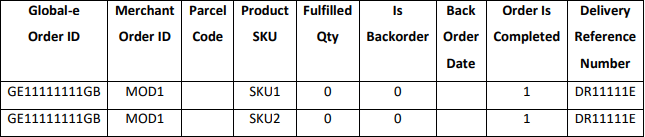
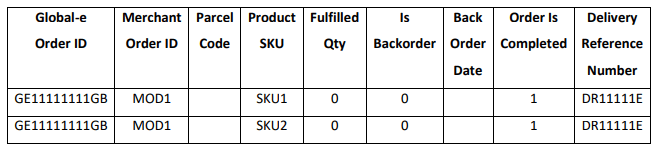
This example describes a scenario where all orders are SNA and cannot be fulfilled, and a notification is sent to Global-e through the manifest to update and refund the customer. In this example the customer has purchased the following products:- SKU 1 – quantity 1
- SKU 2 – quantity 1
Shipping Scenario
The following describes the shipping scenario for this example:- Both products are out of stock so the Merchant sends Global-e a notification with Is Completed flag set to 1 (order is completed).
- The parcel codes are missing (since nothing is actually being shipped) and quantities show 0.
In this situation, merchants do not need to notify Global-e through the EOD manifest if they send an Order Status Update notification via API. Contact your account manager or Technical Support if you are unsure if the Order Status Update API is implemented for your store.
- SKU 1 – quantity 1
- SKU 2 – quantity 1
In this situation, Merchants do not need to notify Global-e through the EOD manifest if they send an Order Status Update notification via API.Contact your Account Manager or Technical Support if you are unsure if the Order Status Update API is implemented for your store.
- SKU 1 – quantity 5

- SKU 1 – quantity 2
- SKU 2 – quantity 1
- SKU 3 – quantity 3
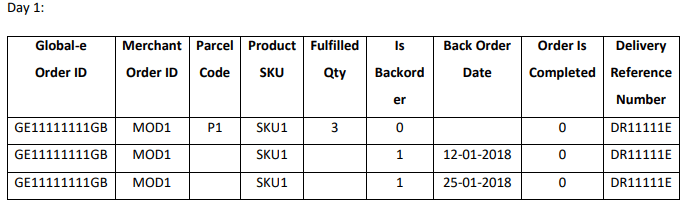
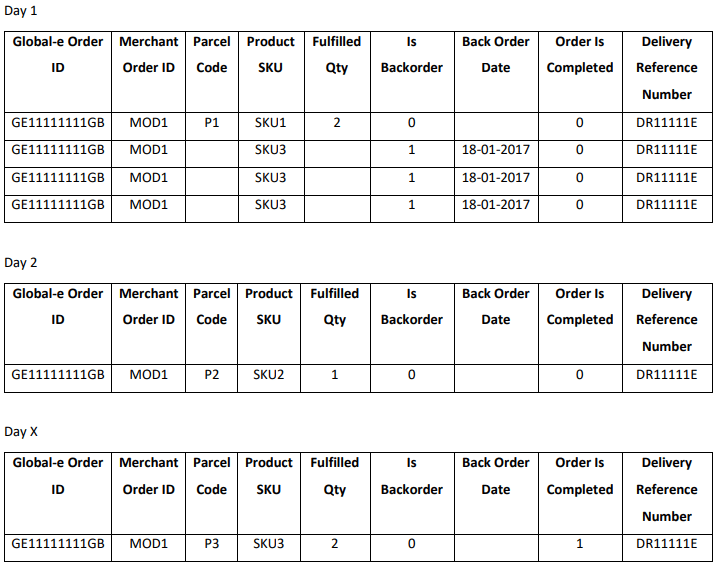
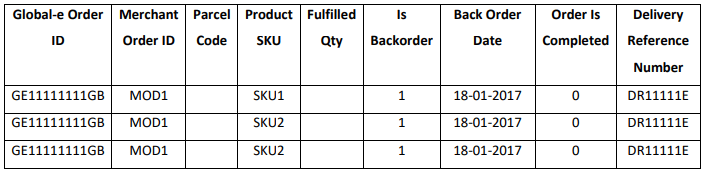
- One parcel, P1, is received at the hub with SKU 1. The order is marked as incomplete and some of the items are marked as backordered.
- The P1 parcel is processed and dispatched to the customer. The customer is notified of the backordered items.
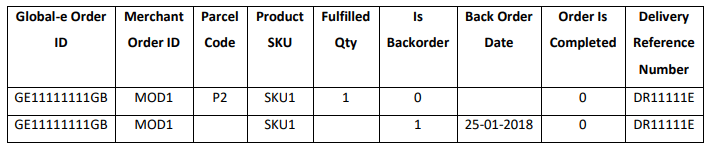
- The following day, the P2 parcel arrives at the hub with SKU 2 item. The order is still incomplete.
-
In x days, the backordered items arrive at the hub in parcel P3. The order is marked as completed. The manifest processor:
- Recognizes that one of the items (SKU3) is missing.
- Refunds the customer and amends export documents for parcel P3.
- Dispatches the parcel to the customer.
- SKU 1 – quantity 1
- SKU 2 – quantity 2
Example 1: Single Parcel Order with All Items in Stock
Description
This example describes a single parcel order when all items are in stock. In this example the customer has purchased the following products:- SKU 1
- SKU 2
- SKU 3 - quantity 1