

Free Shipping Threshold
Overview
Use the Global-e Free Shipping Threshold feature to offer enticing shipping incentives directly to customers, increasing sales and revenue while enhancing the shopping experience. During the shopping session, Global-e presents the free shipping threshold, highlighting the amount required to qualify for free shipping. This motivates customers to include additional items in their carts before proceeding to checkout, ensuring their active engagement. To implement this feature, you can choose to:- Use our convenient Free Shipping Threshold Component and customize the feature to match your brand and design.
- Leverage your design expertise with the Global-e GetFreeShippingThreshold method implementation
Free Shipping Threshold Component
Use Global-e’s Free Shipping Threshold Component to quickly and easily implement the Free Shipping Threshold functionality on your site. The component consists of a basic design that displays the Free Shipping Threshold to store visitors. It is configured by Global-e and inserted at the desired location on your site. Before getting started you need to provide Global-e with the following information:- Location on the site where the component should be placed
- The text to be used (if you don’t want the default text)
- Special design requests regarding fonts, colours, or sizes as detailed in Customizable Elements
Customizable Elements
This section provides details about the Free Shipping Threshold customizable elements. Review this section carefully and provide your customization requirements to the Global-e design team. Basic Text The Free Shipping Threshold includes a short sentence presenting the updated value of the threshold. Global-e can modify the text, font, and colour of the message.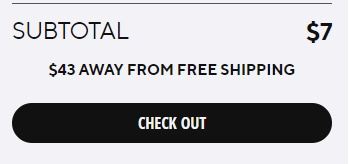
-
Class:
-
Style:
-
The progress bar with numbers
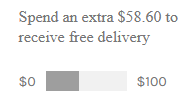
-
The progress bar without numbers
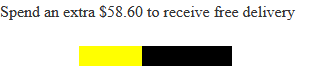
GetFreeShippingThreshold
Use theGetFreeShippigThreshold method with or without GeoIP to get the amount that the shopper needs to reach to qualify for free shipping during the checkout process.
Prerequisite
This feature requires the Global-e Module TypeScript solution.
Get Free Shipping Threshold By GeoIP
TheGetFreeShippingThresholdByGeoIP method retrieves the free shipping threshold value based on the shipping country stored in a cookie on the shopper’s device. This method returns the threshold value that the shopper needs to reach to qualify for free shipping during the checkout process. In addition, it returns data such as the country code, currency code, and cart data.
You do not need to define any parameters for this method as the country and currency are taken from the GeoIP (in the cookie). However, you need to set up a callback for this method, as described below.
**Method Signature:**The method signature for GetFreeShippingThresholdGeoIP is as follows:
GetFreeShippingThresholdByGeoIP method does not require input parameters.
Return type: The GetFreeShippingThresholdByGeoIP method returns the shipping threshold and data in the callback function in an object called IGetFreeShippingThresholdResponse.
The (function (data)) object returns the following properties. Make sure to set up the callback data to receive these properties.
| Property | Type | Description |
|---|---|---|
CountryCode | String | The ISO 3166-1 alpha-2 country code is used to retrieve the shopper’s free shipping threshold based on the GeoIP’s country. |
CurrencyCode | String | The ISO 4217 currency code is used to retrieve the shopper’s free shipping threshold based on the GeoIP’s currency. |
ErrorMessage | String | Any error message that may occur during the method’s execution. Example:ErrorMessge: "Invalid country"If there are no errors, this property is an empty string. Example: ErrorMessage: "" |
ShippingThreshold | Decimal | A number representing the free shipping threshold value for the customer’s shipping country and currency. |
FreeShippingCarrier | String | The name of the carrier that offers free shipping for the customer’s shipping country. |
CartData | Object | An object called IUserCartLocalizeSetting contains additional cart data for the customer. |
CartData object includes the following properties:
| Property | Type | Description |
|---|---|---|
CountryCode | String | The ISO 3166-1 alpha-2 country code is used to retrieve the shopper’s free shipping threshold based on the GeoIP’s country. |
CurrencyCode | String | The ISO 4217 currency code is used to retrieve the shopper’s free shipping threshold based on the GeoIP’s currency. |
CartTotalPrice | Decimal | A number representing the total price of the customer’s cart. |
CurrencySymbol | String | A string representing the symbol used for the currency in the customer’s cart. |
ErrorMessage property of the IGetFreeShippingThresholdResponseinterface must contain a string value describing the error.
Callback:
Create a callback function and define the object data to match the properties in the method’s return (IGetFreeShippingThresholdResponse). See the Return Type section.
Here is an example of how to use the method:
In this example, the GetFreeShippingThresholdByGeIP method is called with the default US country code and the USD currency code found in the GeoIP (cookie). The callback function is passed and it logs the result of the method’s execution to the console. The result includes the free shipping threshold value based on the GeoIP, the name of the carrier that offers free shipping, and additional cart data for the customer.
GetFreeShippingThresholdByGeoIP effectively:
- Make sure that the necessary Global‑e scripts are loaded before calling the method: use the
window['GlobalE_Localize_Set']function to set the data parameter. This will ensure that theGetFreeShippingThresholdByGeoIPmethod has access to the necessary information to calculate the free shipping threshold value. - Call the method only when necessary. Since the method relies on the customer’s location and cart data, avoid calling the method more often than necessary to conserve resources and minimize unnecessary requests.
- Consider caching the result of the method’s execution. To avoid making unnecessary requests to the server, you can cache the result of the
GetFreeShippingThresholdByGeoIPmethod’s execution and reuse it when appropriate.
Get Free Shipping Threshold (Without GeoIP)
Use theGetFreeShippingThreshold method to retrieve the shopper’s free shipping threshold value for a specific country and currency that you define. This method returns the threshold value that the shopper needs to reach to qualify for free shipping during the checkout process. In addition, it returns data such as the country code, currency code, and cart data.
In addition to defining the country and currency parameters, you need to set up a callback for this method, as described below.
Method Signature: The method signature for GetFreeShippingThreshold is as follows:
| Parameter | Type | Description |
|---|---|---|
CountryCode | String | Set the ISO 3166-1 alpha-2 code for the country to retrieve the shopper’s free shipping threshold. |
CurrencyCode | String | Set the ISO 4217 currency code for the currency to retrieve the shopper’s free shipping threshold. |
GetFreeShippingThresholdByGeoIP method returns the shipping threshold and data in the callback function in an object called IGetFreeShippingThresholdResponse.The (function (data)) object returns the following properties.
Make sure to set up the callback data to receive these properties.
| Property | Type | Description |
|---|---|---|
CountryCode | String | The ISO 3166-1 alpha-2 country code is used to retrieve the shopper’s free shipping threshold based on the country you defined. |
CurrencyCode | String | The ISO 4217 currency code is used to retrieve the shopper’s free shipping threshold based on the currency you defined. |
ErrorMessage | String | Any error message that may occur during the method’s execution. Example:ErrorMessge: "Invalid country"If there are no errors, this property is an empty string. Example: ErrorMessage: "" |
ShippingThreshold | Decimal | A number representing the free shipping threshold value for the customer’s shipping country and currency. |
FreeShippingCarrier | String | The name of the carrier that offers free shipping for the customer’s shipping country. |
CartData | Object | An object called IUserCartLocalizeSetting contains additional cart data for the customer. |
CartData object includes the following properties:
| Property | Type | Description |
|---|---|---|
CountryCode | String | The ISO 3166-1 alpha-2 country code is used to retrieve the shopper’s free shipping threshold based on the country selected by the shopper. |
CurrencyCode | String | The ISO 4217 currency code is used to retrieve the shopper’s free shipping threshold based on the country and currency selected by the shopper. |
CartTotalPrice | Decimal | A number representing the total price of the customer’s cart. |
CurrencySymbol | String | A string representing the symbol used for the currency in the customer’s cart. |
ErrorMessage property of the IGetFreeShippingThresholdResponseinterface must contain a string value describing the error.
Callback:
Create a callback function and define the object data to match the properties in the method’s return (IGetFreeShippingThresholdResponse). See the Return Type section.
Here is an example of how to use the method:
In this example, the GetFreeShippingThreshold method is called with the US country code and the USD currency code. The callback function is passed and it logs the result of the method’s execution to the console. The result includes the free shipping threshold value, the name of the carrier that offers free shipping, and additional cart data for the customer.
GetFreeShippingThreshold effectively:
- Make sure to pass in the correct country code and currency code for the customer’s location and cart data to ensure accurate results.
- Call the method only when necessary. Since the method relies on the customer’s location and cart data, merchants, avoid calling the method more often than necessary to conserve resources and minimize unnecessary requests.
- Consider caching the result of the method’s execution. To avoid making unnecessary requests to the server, you can cache the result of the
GetFreeShippingThresholdmethod’s execution and reuse it when appropriate.