Page Design
Customizing the Checkout and Confirmation Pages
This section details the items that are customisable on both the Checkout and Confirmation pages. You can use this Figma page to make any customizations that you require. Duplicate and modify the file as needed.The checkout page layout is fixed (it cannot be changed).
Checkout Page
The Checkout page shows the following:- Order Summary
- Billing and Shipping Addresses
- Shipping Method
- Billing Summary and Payment
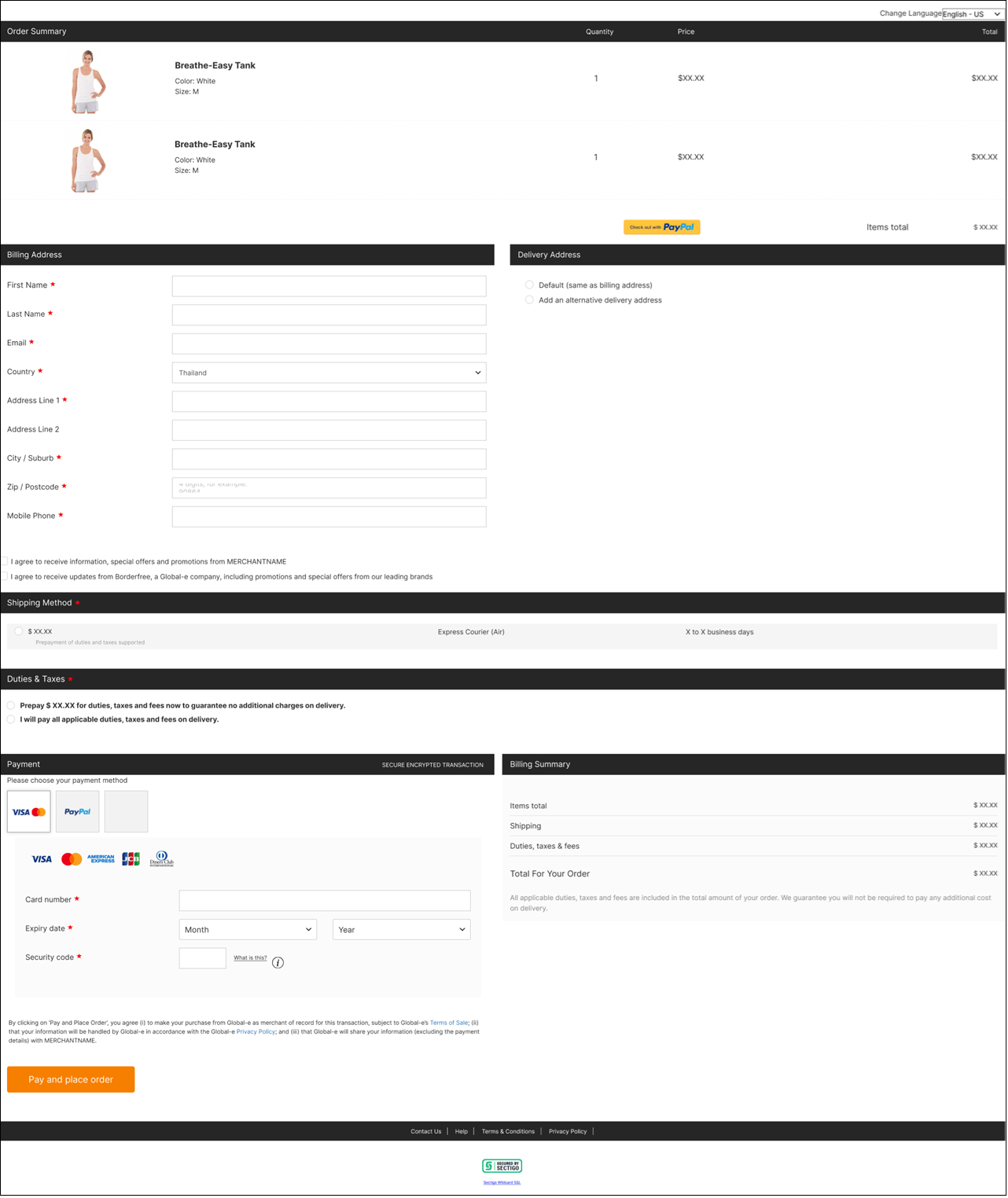



Checkout Page Layout Structure
This page describes the following page layout structures:Desktop Checkout Layout Structure
This section describes the layout (structure) of the Desktop Checkout page and customisable elements. The Desktop Checkout page has been divided into its main elements, with each region described separately. The table on the right describes the Order Summary area below:| Desktop_Callouts_1-8__Excluding_Express_Payment_Section_.png | No.ElementDescription1Background colorThe background color of the entire page.2Language selectorThe text front and dropdown input style.3Title headerThe ribbon background color, text font, and text color.4Order Summary areaFont-face, size, and color.5Product nameFont-face, size, and color.6Product attributesFont-face, size, and color.7Quantity, price, and totalFont-face, size, and color. | No. | Element | Description | 1 | Background color | The background color of the entire page. | 2 | Language selector | The text front and dropdown input style. | 3 | Title header | The ribbon background color, text font, and text color. | 4 | Order Summary area | Font-face, size, and color. | 5 | Product name | Font-face, size, and color. | 6 | Product attributes | Font-face, size, and color. | 7 | Quantity, price, and total | Font-face, size, and color. |
|---|---|---|---|---|---|---|---|---|---|---|---|---|---|---|---|---|---|---|---|---|---|---|---|---|---|
| No. | Element | Description | |||||||||||||||||||||||
| 1 | Background color | The background color of the entire page. | |||||||||||||||||||||||
| 2 | Language selector | The text front and dropdown input style. | |||||||||||||||||||||||
| 3 | Title header | The ribbon background color, text font, and text color. | |||||||||||||||||||||||
| 4 | Order Summary area | Font-face, size, and color. | |||||||||||||||||||||||
| 5 | Product name | Font-face, size, and color. | |||||||||||||||||||||||
| 6 | Product attributes | Font-face, size, and color. | |||||||||||||||||||||||
| 7 | Quantity, price, and total | Font-face, size, and color. |
| Express_Payment_Buttons_-_Desktop_Callout.png | No.ElementDescription1Express payment sectionSection background, font-face, size, and color. | No. | Element | Description | 1 | Express payment section | Section background, font-face, size, and color. |
|---|---|---|---|---|---|---|---|
| No. | Element | Description | |||||
| 1 | Express payment section | Section background, font-face, size, and color. |
| Desktop_Checkout_Layout__Callout_10_.png | Desktop_Checkout_Layout__Callout_10_.png | No.ElementDescription1Background colorThe background color of the page. | No. | Element | Description | 1 | Background color | The background color of the page. |
|---|---|---|---|---|---|---|---|---|
| Desktop_Checkout_Layout__Callout_10_.png | ||||||||
| No. | Element | Description | ||||||
| 1 | Background color | The background color of the page. |
| Desktop_Checkout_Layout__Callouts_11-14_.png | Desktop_Checkout_Layout__Callouts_11-14_.png | No.ElementDescription1Billing Summary areaThe following:Input text: font-face, size, and colorDrop-down and floating labels option2Field titles and valuesFont-face, size, and color (can be different for titles and values).3Total title and valueFont-face, size, and color (can be different for titles and values.4Pay buttonThe button background, font-face, size, and color. | No. | Element | Description | 1 | Billing Summary area | The following: Input text: font-face, size, and color Drop-down and floating labels option | 2 | Field titles and values | Font-face, size, and color (can be different for titles and values). | 3 | Total title and value | Font-face, size, and color (can be different for titles and values. | 4 | Pay button | The button background, font-face, size, and color. |
|---|---|---|---|---|---|---|---|---|---|---|---|---|---|---|---|---|---|
| Desktop_Checkout_Layout__Callouts_11-14_.png | |||||||||||||||||
| No. | Element | Description | |||||||||||||||
| 1 | Billing Summary area | The following: Input text: font-face, size, and color Drop-down and floating labels option | |||||||||||||||
| 2 | Field titles and values | Font-face, size, and color (can be different for titles and values). | |||||||||||||||
| 3 | Total title and value | Font-face, size, and color (can be different for titles and values. | |||||||||||||||
| 4 | Pay button | The button background, font-face, size, and color. |
The Desktop checkout page layout is fixed (it cannot be changed).
Mobile Checkout Layout Structure
This section describes the layout (structure) of the Mobile Checkout page and customisable elements. The Mobile Checkout page has been divided into its main elements, with each region described separately. The table on the right describes the Order Summary area below: The table on the right describes the Order Summary area below:| Mobile_Callouts_1-7__Excluding_Express_Payment_Section_.png | No.ElementDescription1Background colorThe background color of the entire page.2Language selectorThe text font and dropdown input style.3Title headerThe ribbon background color, text font, and text color.4Product nameFont-face, size, and color.5Product attributesFont-face, size, and color.6Quantity, price, and totalFont-face, size, and color.7Total price of all productsFont-face, size, and color. | No. | Element | Description | 1 | Background color | The background color of the entire page. | 2 | Language selector | The text font and dropdown input style. | 3 | Title header | The ribbon background color, text font, and text color. | 4 | Product name | Font-face, size, and color. | 5 | Product attributes | Font-face, size, and color. | 6 | Quantity, price, and total | Font-face, size, and color. | 7 | Total price of all products | Font-face, size, and color. |
|---|---|---|---|---|---|---|---|---|---|---|---|---|---|---|---|---|---|---|---|---|---|---|---|---|---|
| No. | Element | Description | |||||||||||||||||||||||
| 1 | Background color | The background color of the entire page. | |||||||||||||||||||||||
| 2 | Language selector | The text font and dropdown input style. | |||||||||||||||||||||||
| 3 | Title header | The ribbon background color, text font, and text color. | |||||||||||||||||||||||
| 4 | Product name | Font-face, size, and color. | |||||||||||||||||||||||
| 5 | Product attributes | Font-face, size, and color. | |||||||||||||||||||||||
| 6 | Quantity, price, and total | Font-face, size, and color. | |||||||||||||||||||||||
| 7 | Total price of all products | Font-face, size, and color. |
| Express_Payment_Buttons_-_Mobile_Callout.png | No.ElementDescription1Express payment sectionSection background, font-face, size, and color. | No. | Element | Description | 1 | Express payment section | Section background, font-face, size, and color. |
|---|---|---|---|---|---|---|---|
| No. | Element | Description | |||||
| 1 | Express payment section | Section background, font-face, size, and color. |
| Mobile_Checkout_Layouts__Callouts_6_.png | Mobile_Checkout_Layouts__Callouts_6_.png | No.ElementDescription1Text and menu fieldsThe following:Input text and drop-down: font-face, size and colorOptional- Floating label option | No. | Element | Description | 1 | Text and menu fields | The following: Input text and drop-down: font-face, size and color Optional- Floating label option |
|---|---|---|---|---|---|---|---|---|
| Mobile_Checkout_Layouts__Callouts_6_.png | ||||||||
| No. | Element | Description | ||||||
| 1 | Text and menu fields | The following: Input text and drop-down: font-face, size and color Optional- Floating label option |
| Billing_Summary_Callouts.png | No.ElementDescription1Field titles and valuesFont-face, size, and color (can be different for titles and values).2Total title and valueFont-face, size, and color (can be different for titles and values).3Duties and taxes noteFont-face, size, and color (can be different for titles and values). | No. | Element | Description | 1 | Field titles and values | Font-face, size, and color (can be different for titles and values). | 2 | Total title and value | Font-face, size, and color (can be different for titles and values). | 3 | Duties and taxes note | Font-face, size, and color (can be different for titles and values). |
|---|---|---|---|---|---|---|---|---|---|---|---|---|---|
| No. | Element | Description | |||||||||||
| 1 | Field titles and values | Font-face, size, and color (can be different for titles and values). | |||||||||||
| 2 | Total title and value | Font-face, size, and color (can be different for titles and values). | |||||||||||
| 3 | Duties and taxes note | Font-face, size, and color (can be different for titles and values). |
The Mobile checkout page layout is fixed (it cannot be changed).
Confirmation Page
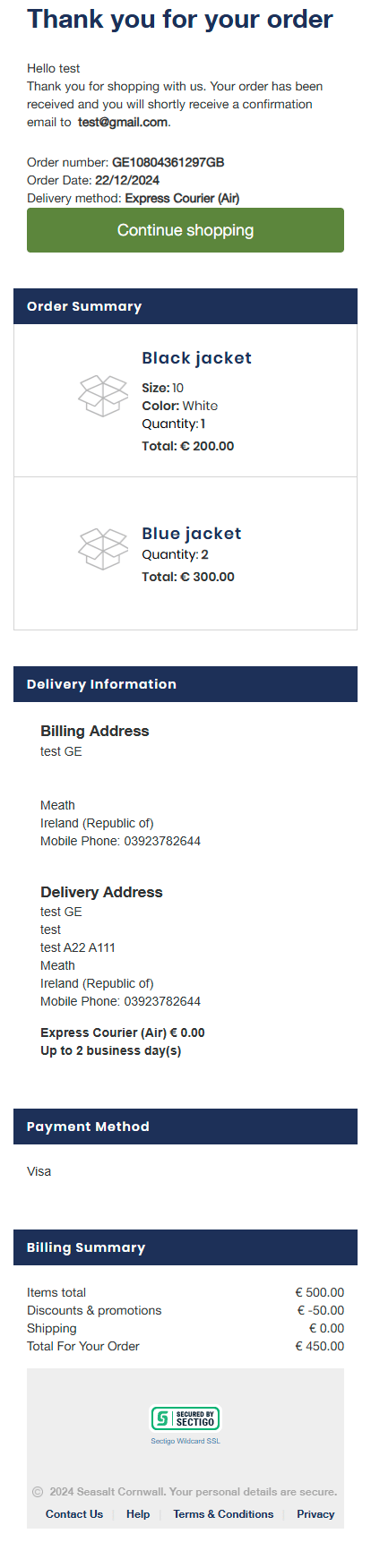
The Confirmation page shows the page displayed after a merchant’s order has been confirmed.The Confirmation page layout is fixed (it cannot be changed).
Desktop Confirmation Page Example
The following figure shows a Desktop Confirmation page example: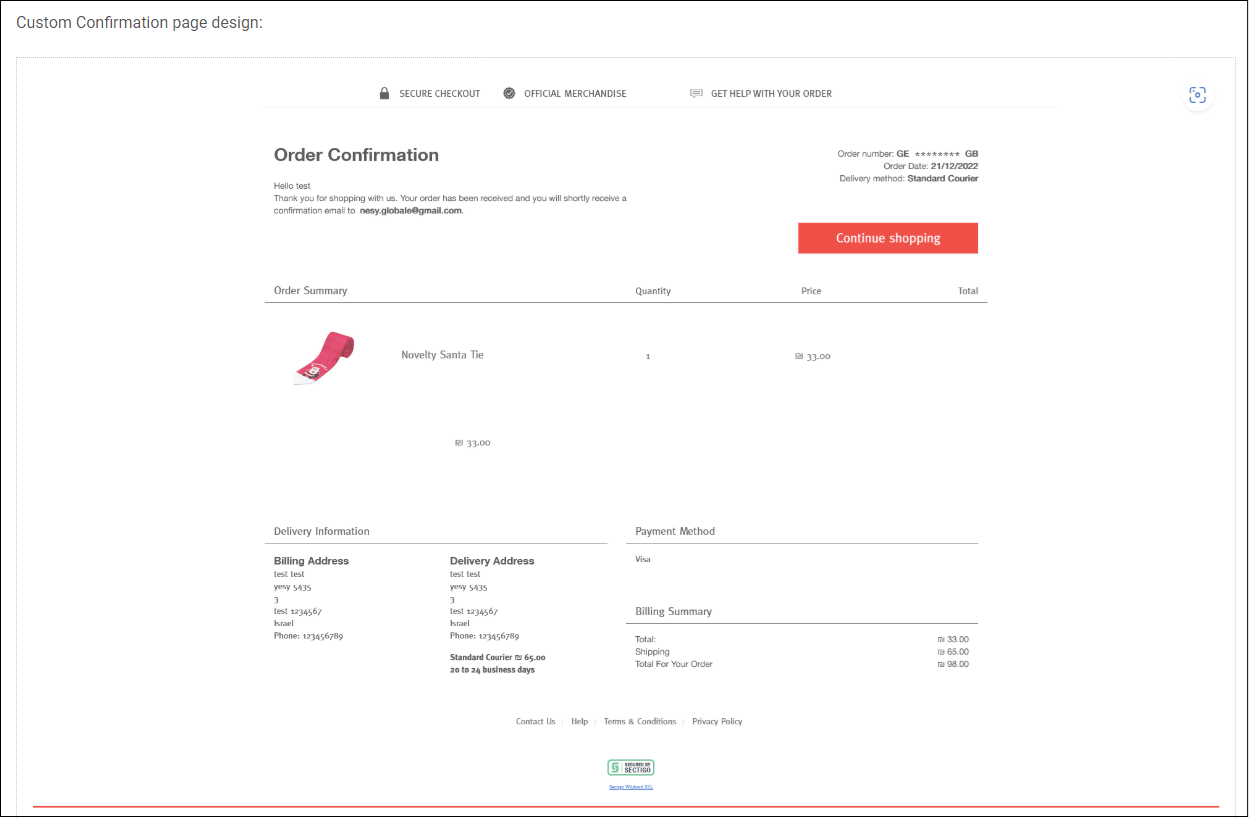
Mobile Confirmation Page Example
The following figure shows the Mobile confirmation page example: