

Shipping Lines
When the Global-e CrossBorder app is installed in Shopify, a shipping zone with Global-e operated countries is automatically added. The order shipping lines data is standardized by Shopify and cannot be changed.- Source: fixed value Global-e Carrier Service.
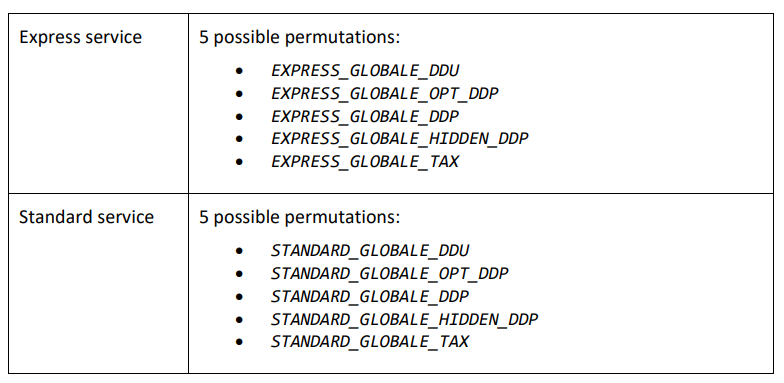
- Title: two possible values, Express Courier (Air) or Standard Courier.
- Code: multiple permutations depending on service type. Will always contain ‘GLOBALE’.
Shipping Information
Shopify shows the carrier service level chosen by the customer in the checkout, as shown in the following figure.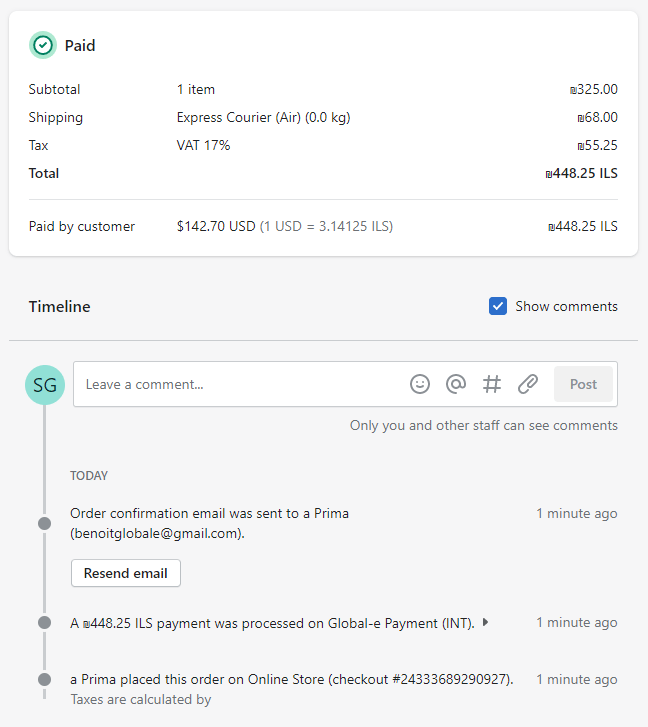
Shipping Technical Details
To identify Global-e orders for shipping purposes, you can review the information provided by each order placed through Global-e services on our Native integration:| shipping_line | Value | Example |
|---|---|---|
“title” | Service level | Standard courier |
“source” | The Global‑e carrier service | Globale carrier service |
“code” | Always contains GLOBALE | 123_GLOBALE_HIDDEN_DDP |
- If an order is fully paid using a gift card, the only payment gateway name will be “gift_card”.
- If a free draft order is placed, the gateway name will be empty since there was no payment.
- Under Checkout Extensibility, credit card orders will contain the string “Global-e Onsite Payment”, otherwise, the payment gateway name will be “Global-e Payments”.