

Global‑e Add-on Architecture

- The currency conversion
- The checkout for Global‑e managed countries
- Order notifications for orders managed by Global‑e
- The welcome popup
- The country selector
- The checkout iframe
SendCartV2 API.
The customer is redirected to a checkout page checkoutDisplay.jsp, in which Global‑e injects HTML via an iframe.
Green: Custom Global‑e add-on functionality:
Globaleaddonis used for front-end changes.globalecoreandglobalefacadesare used to communicate with the Global‑e API.globaleendpointis used to receive order update notifications.globalepromotionsis used for custom Global‑e promotions.globalebackofficeis used for Backoffice modifications.
Important spring beans are aliased or overwritten by the Global‑e logic. This includes the
calculationService and europe1.manager.Modules Architecture
- Server-side browsing localisation
- International Checkout from cart data
- Orders in SAP Hybris were created following the native SAP Hybris creation flow with additional Global‑e Data Attributes
- Fraud validation / order cancellation
- Order updates (e.g. refund notifications)

globaleaddon
Theglobaleaddon adds the Global‑e Country Selector and the Managed Checkout capability to the SAP Hybris Accelerator-based Storefront.
The globaleaddon includes:
- If you have a multi-site environment, you can control each website to which you want to add the Global‑e capability.
-
The
GlobaleSwitcherComponentadds a widget to allow the customer to select their preferred currency and shipping country. The CSS of this component can either be stored and managed by Global‑e or stored and managed by SAP Hybris. - To enable the Global-e CSS, check the configuration “Use Global-e Default CSS”.
-
The Global‑e checkout page includes a Global‑e iframe. The OOTB SAP Hybris Accelerator checkout flow definition is overridden by the
globaleaddon-web-spring.xml. The global-e checkout flow is only applicable to Global‑e managed countries. -
GlobaleCookieToSessionFilterupdates the SCC session with Global‑e specific values, such as the session currency, country, culture, and activities of the customer. The cookie:GlobalE_Datais updated by theGlobaleCookieToSessionFilterfilter when the customer comes to the site for the first time and has not yet selected their currency or shipping country. This is based on the location taken from the customer IP via an API call to Global‑e.
globalecore
globalecore places REST API calls to the Global‑e API. globalecore uses custom-built caching to speed up the retrieval of the Global‑e data sets from the database.
Client
The Global‑e implementation uses theSpring RestTemplate to communicate with the Global‑e API.
The RestTemplate is the central Spring class for client-side HTTP access.
Conceptually, it is like the JdbcTemplate, JmsTemplate, and the various other templates found within the Spring Framework.
This means, for instance, that the RestTemplate is thread-safe once constructed, and that you can use callbacks to customize its operations.
API Connection Timeouts
By default, the Global‑e Add-on includes a configuration for API connection timeouts. Each timeout represents the maximum time to wait for a Global‑e API response. If there is no response by the expiration time, the call fails. Here are some examples of key values that you can see in yourlocal. Properties:
globale.api.call.timeout=2000globale.api.connect.timeout=1000globale.api.call.max.connections.host=100globale.api.call.max.total.connections=200
Fixed Product Prices
Fixed prices are used to define a Recommended Retail Price (RRP) per country in the local currency. Fixed prices do not change regardless of Global‑e coefficients, rounding rules, or FX rates. The fixed price selection process can be configured: (1) By country and currency – or – (2) By currency and it is active for all countries that support this feature. To enable or disable fixed prices based on country, use the Global-e API. To activate the fallback mechanism (2), Add the property ‘globale.fixed.price.fallback.to.currency.match.enabled=true’. The fixed price algorithm determines if aPriceRow contains a fixed price for the country and currency (1):
- If Global‑e has enabled the session country to allow fixed prices.
- AND the type of
PriceRowis aGlobalePriceRow, - AND the
PriceRow’sfixedPriceEnabledequals true, - AND the
PriceRow’s currency equals the Global‑e session’s currency, - THEN the Price service selects
PriceRowwith country equals Global-e (session)countryAlgorithmto determine if aPriceRowcontains a fixed price for currency (2): - WHEN there is no price identified by (1),
- AND Global‑e has enabled the session country to allow fixed prices,
- AND the type of
PriceRowis aGlobalePriceRow, - AND the
PriceRow’sfixedPriceEnabledequals true, - AND the
PriceRow’s currency equals Global‑e (session) currency, - THEN the Price service selects the
PriceRowthat has no defined country.
Solr
The Global‑e Add-on extends the ProductPriceValueProvider and alias with the Global‑e price value provider: GlobaleProductPriceValueProvider. The price value provider sets the session parameters to ensure that the Global-e add-on has the correct session parameters for price conversion when it creates the price information.GlobalESessionCountryISOCode: taken from thecmsSite defaultShipToCountry.GlobalESessionCultureCode: set to an empty string.GlobalESessionCurrencyISOCode: not set, butDefaultGlobaleSessionParametersServicefalls back toi18nService.getCurrentCurrency()which is set inProductPriceValueProvidertaken fromIndexConfigcurrencies.GlobalESessionSolr: truecatalogVersionService.setSessionCatalogVersionto the base site’s default catalogue and version.
globaleendpoint
Global‑e sends notifications to theglobaleendpoint module. Currently, four notifications are sent via JSON and marshalledmarshalled by the Jackson JSON Processor. POJOs corresponding to Global‑e API classes are annotated with Jackson Core (Data-Binding) annotations to facilitate proper mapping.
globalefacades
Theglobalefacadesmodule provides simplified interfaces to the service layers.
Overridden Facades include:
-
DefaultCustomerFacadeis overridden byDefaultGlobaleCustomerFacade. If Global‑e is enabled and the Country is managed by Global‑e, this facade updates the session currency and user. -
SessionOverrideCheckoutFlowFacadeis overridden byGlobaleCheckoutFlowFacade. The Express checkout is never enabled for a customer whose county is enabled by Global‑e. -
Custom Global‑e-specific converters and populators can also be found in
globalefacades-spring.xml.
globalepromotions
Theglobalepromotions extension provides support for the SAP Hybris promotion engine.
This extension adds the following conditions:
- Global‑e-managed country condition as boolean (choose to activate the promotion if either the customer has selected a Global‑e-managed country or has selected a country that is NOT Global‑e-managed).
- Qualifying country promotion with options: “IN”, “NOT IN”. The customer will qualify for the promotion if the session country is either IN or NOT IN a set of countries specified in the condition.
- If you configure a promotion rule with an order threshold condition in Global‑e supported currency, e.g. 10 GBP,
- AND if a customer has another cart currency, for example, CHF, with a cart total value of 15 CHF,
- SAP Hybris converts GBP to CHF and evaluates the condition.
- When SAP Hybris translates a promotion into a Drools rule, Global-e substitutes the static price value with ConvertablePriceValue. The ConvertablePriceValue converts and returns prices in runtime based on the Global-e conversion rules.
-
Global‑e also overrides the key price and discount-related RAO Actions:
GlobaleRuleOrderEntryFixedDiscountRAOActionGlobaleRuleOrderEntryFixedPriceRAOActionGlobaleRuleOrderFixedDiscountRAOActionGlobaleRulePartnerOrderEntryFixedDiscountRAOActionGlobaleRulePartnerOrderEntryFixedPriceRAOActionGlobaleRuleTargetBundlePriceRAOAction
globalebackoffice
globalebackoffice is for Backoffice changes which you can configure in: globalebackoffice-backoffice-config.xml.
The Global‑e add-on also overrides the CurrencyTypeRenderer with the GlobaleCurrencyTypeRenderer to support sub-types of Order Entry.
Cache
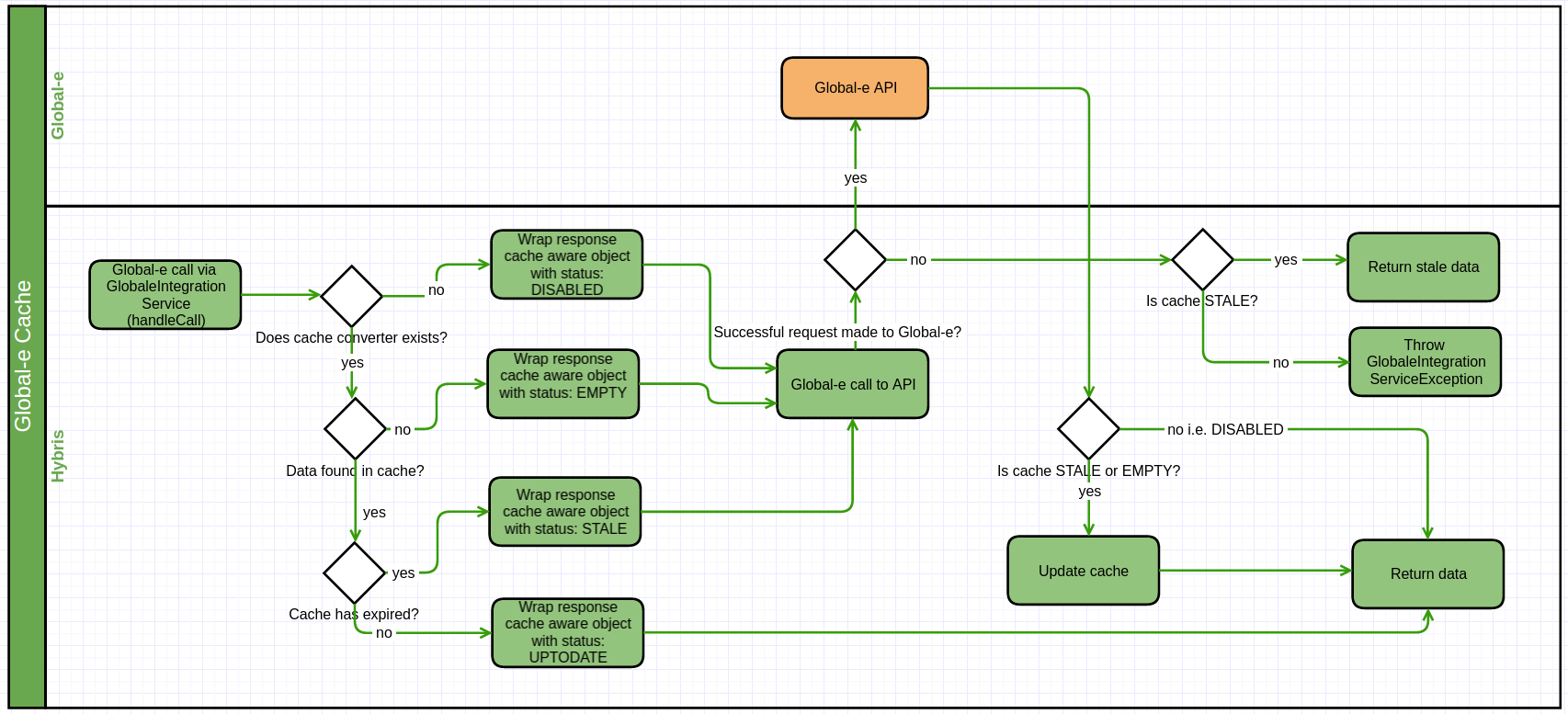
Request Flow
When a request is made to the integration service, the following steps take place:- Based on the call parameters, the cache is searched for matching data.
-
If matching data is found:
- The data’s last update time is compared with the current time to create a stale period.
-
If this stale period is shorter than the cache expiry period, the cached data is returned with the status
UPTODATE. -
If this stale period is the same as or longer than the cache expiry period:
- A request is made to the Global‑e API.
-
If the request is successful:
- The resulting data is used to update the cache.
- The resulting data is returned with the status
UPTODATE.
- If the request is not successful, the OLD data is returned with the status STALE.
-
If matching data is NOT found:
- A request is made to the Global‑e API.
-
If the request is successful:
- The resulting data is used to update the cache.
- The resulting data is returned with the status UPTODATE.
-
If the request is not successful:
- An exception is thrown:
GlobaleIntegrationServiceException.
- An exception is thrown:
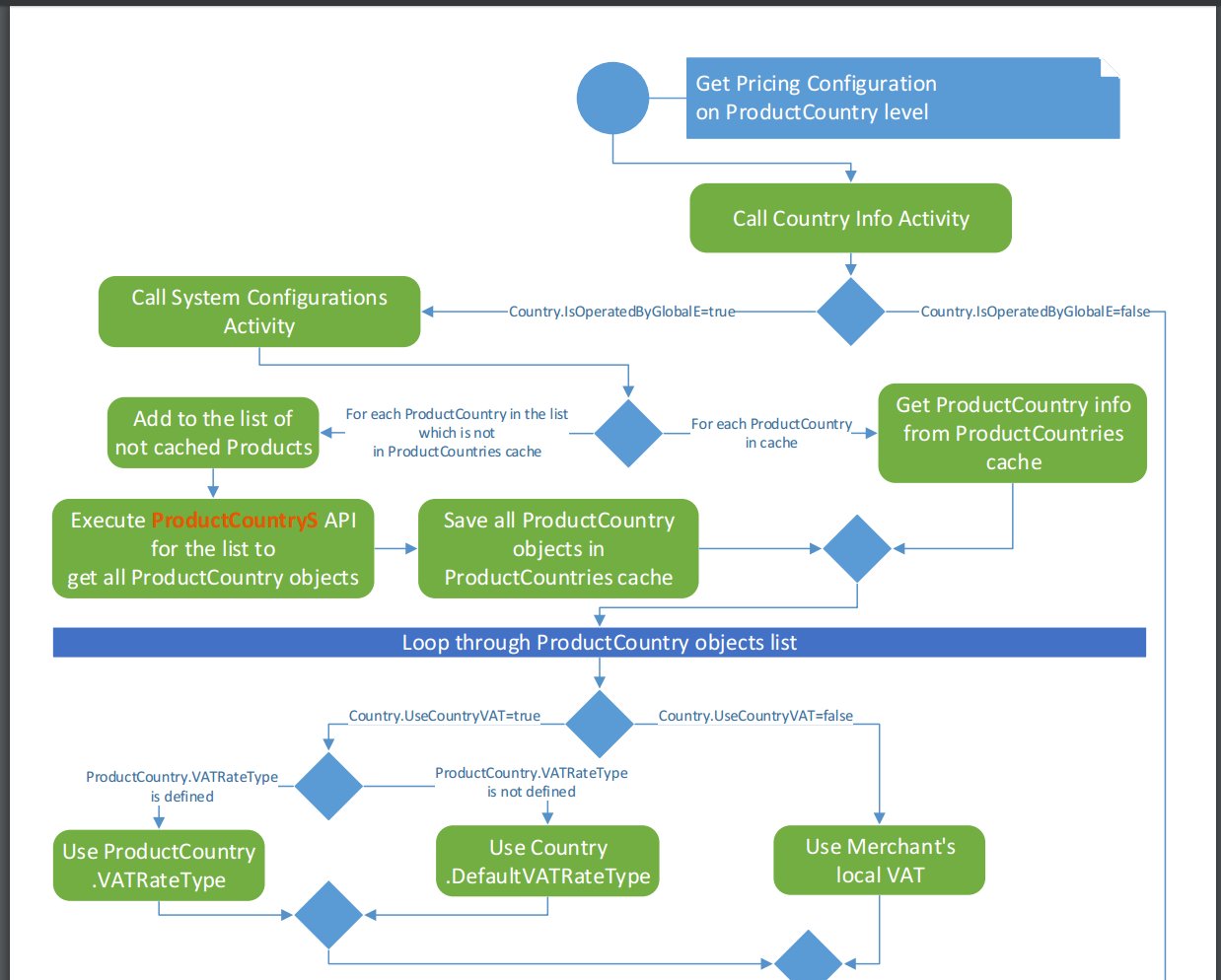
Global‑e Headers
All API method calls may optionally return the following headers:- Cache-Control: public
- max-age=x
Cache Persistence
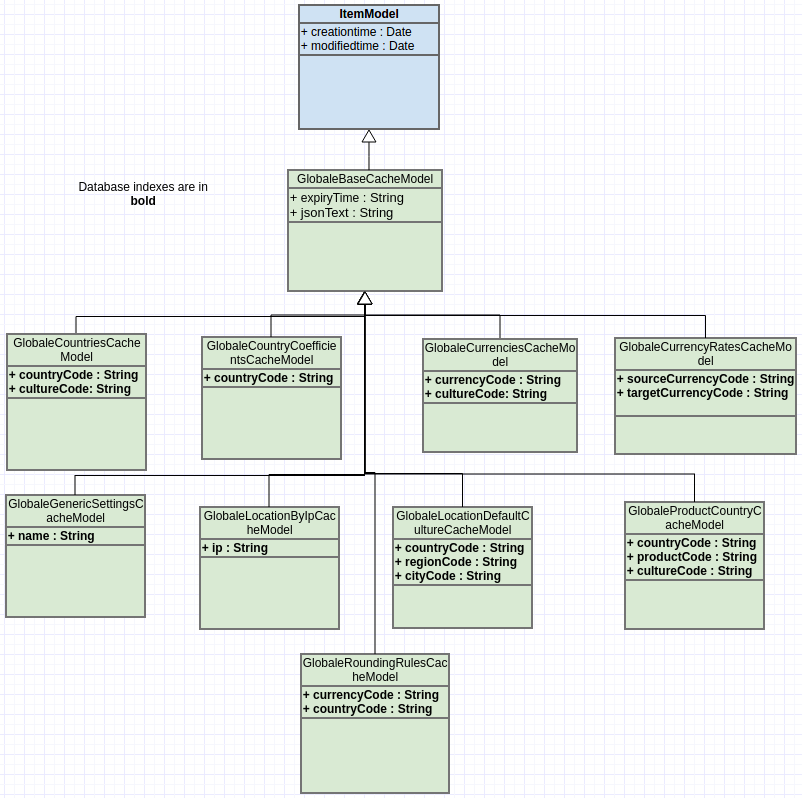
Global‑e relies on the SAP Hybris persistence for caching API data. Global‑e creates new cache types in SAP Hybris with the common ancestorGlobaleBaseCache to store the cache. Cache age is controlled by Global‑e.
Data Structure and Database Indexes
Technical Flows
Checkout Flow (Technical)
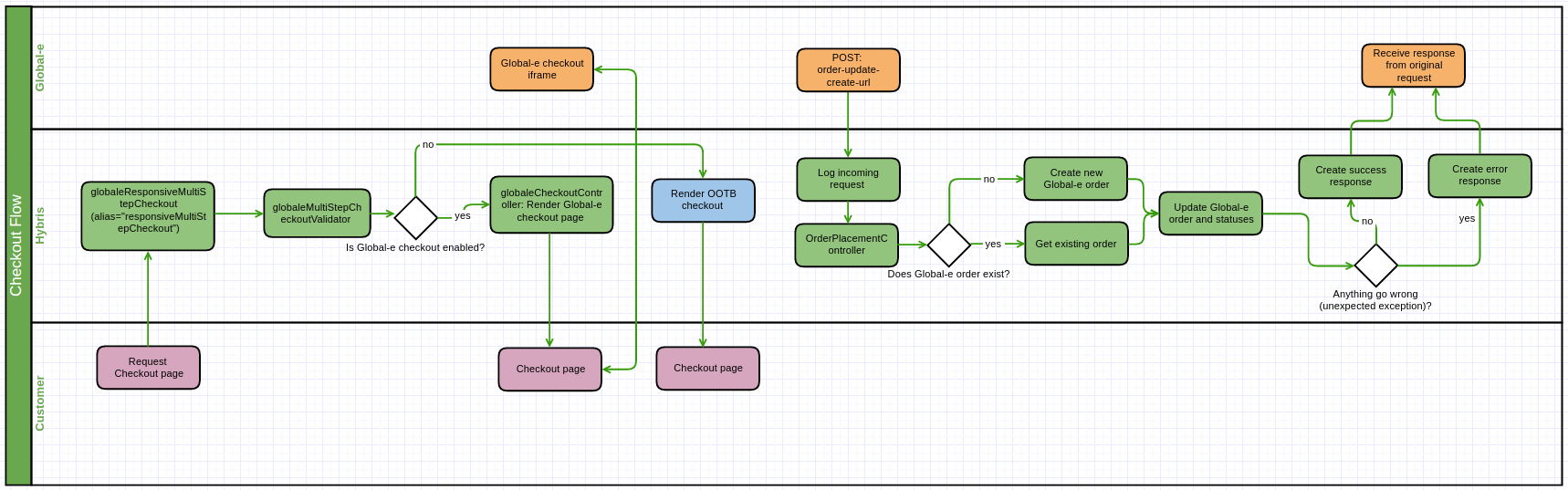
globaleendpoint. This order includes delivery details for the local Global‑e hub, along with the customer’s billing address and payment information.
The JSON file is parsed and converted to a MerchantOrder, which is then unmarshalled again and saved as a string of JSON.
To avoid information loss, if there are missing mappings in the MerchantOrder object, the Global-e add-on makes sure to log any requests in full coming into the web module globaleendpoint using the filter: globaleRequestLogger.
-
If Global‑e is enabled and the session country is managed by Global‑e, the customer is redirected to the Global‑e checkout (otherwise to typical checkout):
- SAP Hybris creates a snapshot of the checkout cart.
- SAP Hybris redirects the customer to the Global‑e checkout page.
-
When the customer submits an order, Global-e creates an internal order.
- If the customer has a default shipping and billing address, the addresses are exported with the “
SendCart” request. - If the customer aborts the checkout process, the customer is redirected back to the cart page.
- If the customer has a default shipping and billing address, the addresses are exported with the “
-
Global‑e receives the cart data and handles the payment. If the fraud check passes successfully, Global‑e notifies SAP Hybris (
OrderPlacementController.sendOrderToMerchant), and a merchant order is created.- The order notification includes delivery details for the local Global-e hub, along with the customer’s billing address and payment information.
- The SAP Hybris order status is updated to
GLOBALE_MANAGED. - To avoid information loss, if there are missing mappings in the
MerchantOrderobject, the Global-e add-on logs any requests coming into the web moduleglobaleendpointusing the filterglobaleRequestLogger.
-
Global‑e manages the order fulfilment lifecycle (see the
OrderPlacementController).- Global‑e updates the order status and registers the status history:
globaleOrderStatusHistory - The current order status is reflected in the custom attribute: GlobaleOrder.currentOrderStatus
- Global‑e can remove the session customer cart on order create/update, based on the
Merchant.Order’sClearCartflag.
- Global‑e updates the order status and registers the status history:
-
Global‑e fires the following events that are integrated into the order’s lifecycle:
SendOrderToMerchantEventPerformOrderPaymentEventUpdateOrderShippingInfoEventUpdateOrderStatusEvent
Global‑e Price Calculation Flow (Technical)
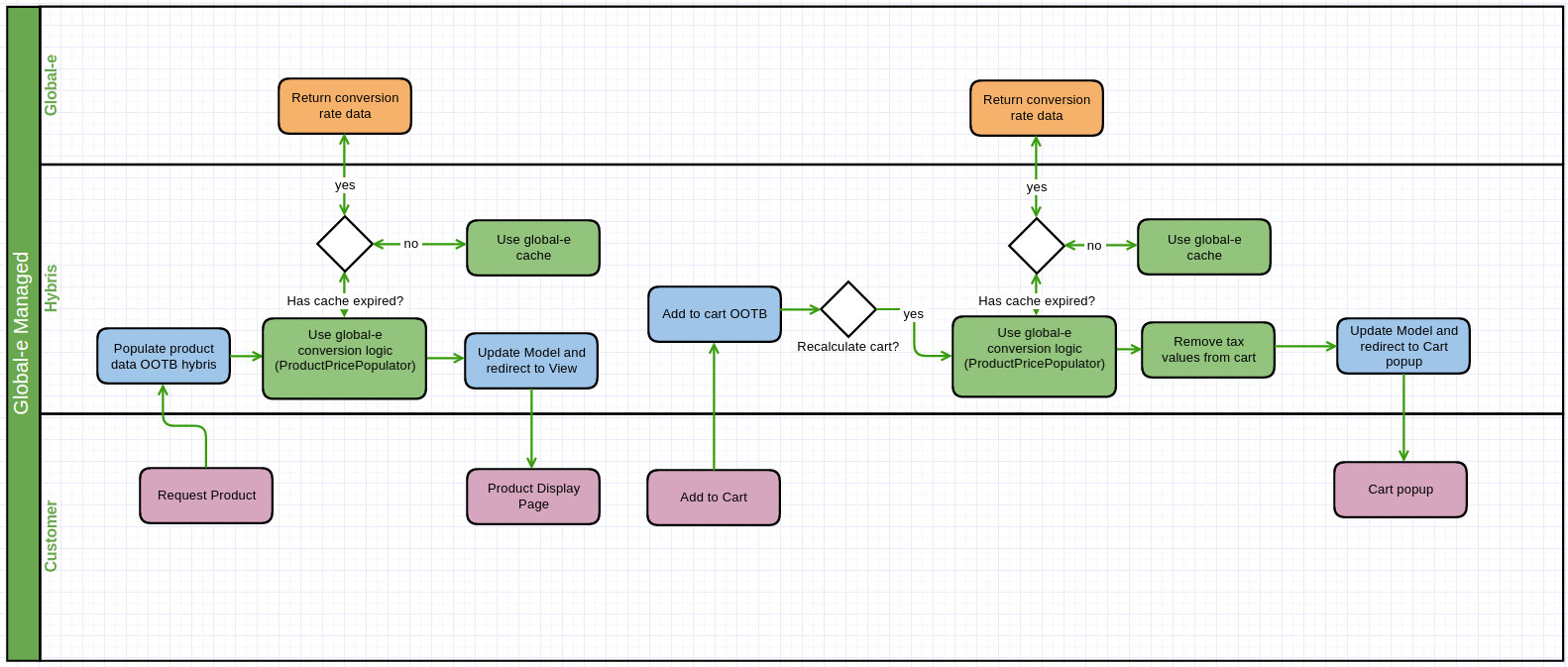
- GlobaleRoundingRulesCache
- GlobaleCountryCoefficientsCache
- GlobaleLocationDefaultCultureCache
- GlobaleCurrenciesCache
- GlobaleCurrencyRatesCache
- GlobaleLocationByIpCache
- GlobaleCountriesCache
- GlobaleGenericSettingsCache
- GlobaleProductCountryCache
Typical Price Calculation Flow (Technical)
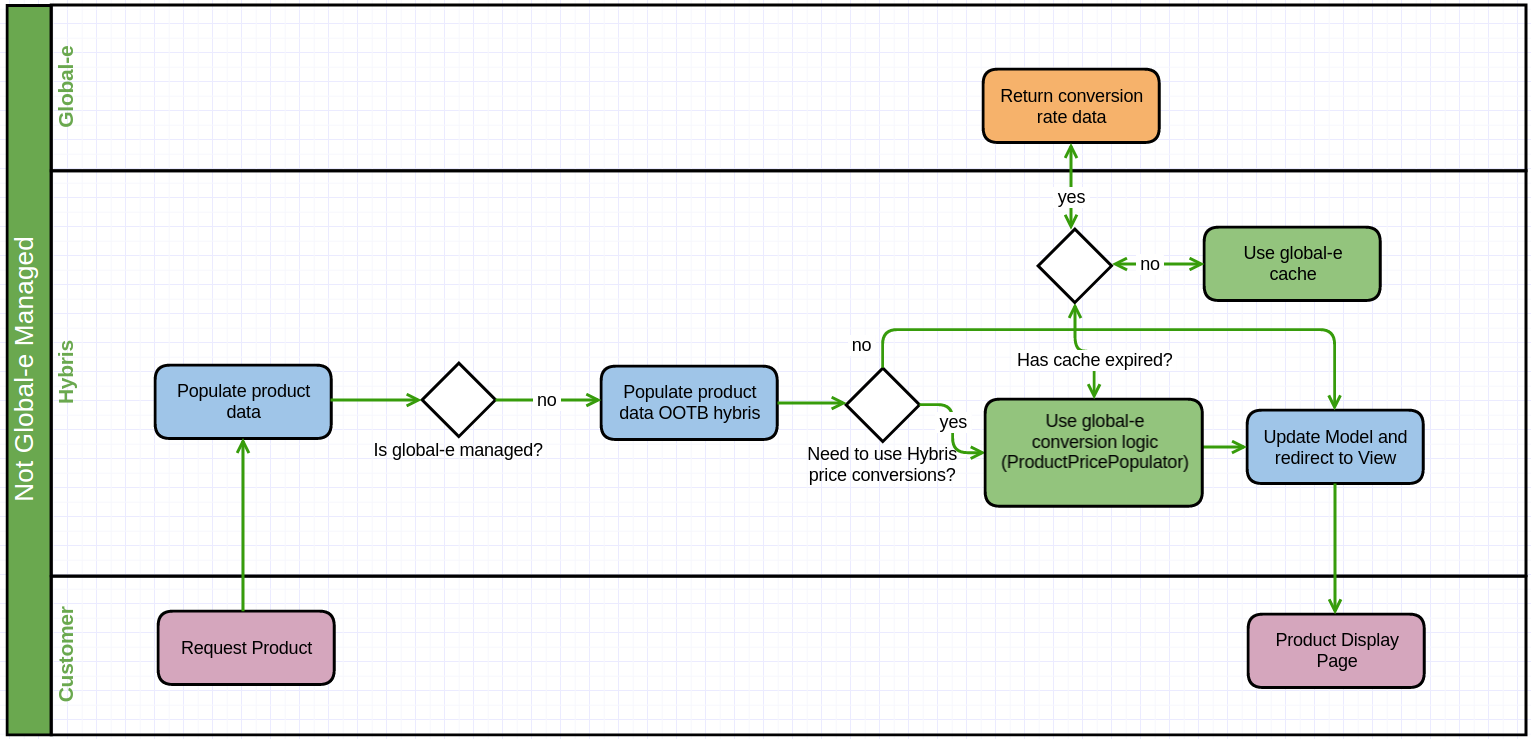
- The country is not managed by Global‑e.
- The customer selects a currency for which the product does not have a price row.
- SCC cannot find a price row and tries to apply the OOTB conversion logic.
User Country and Currency Preference Flow (Technical)
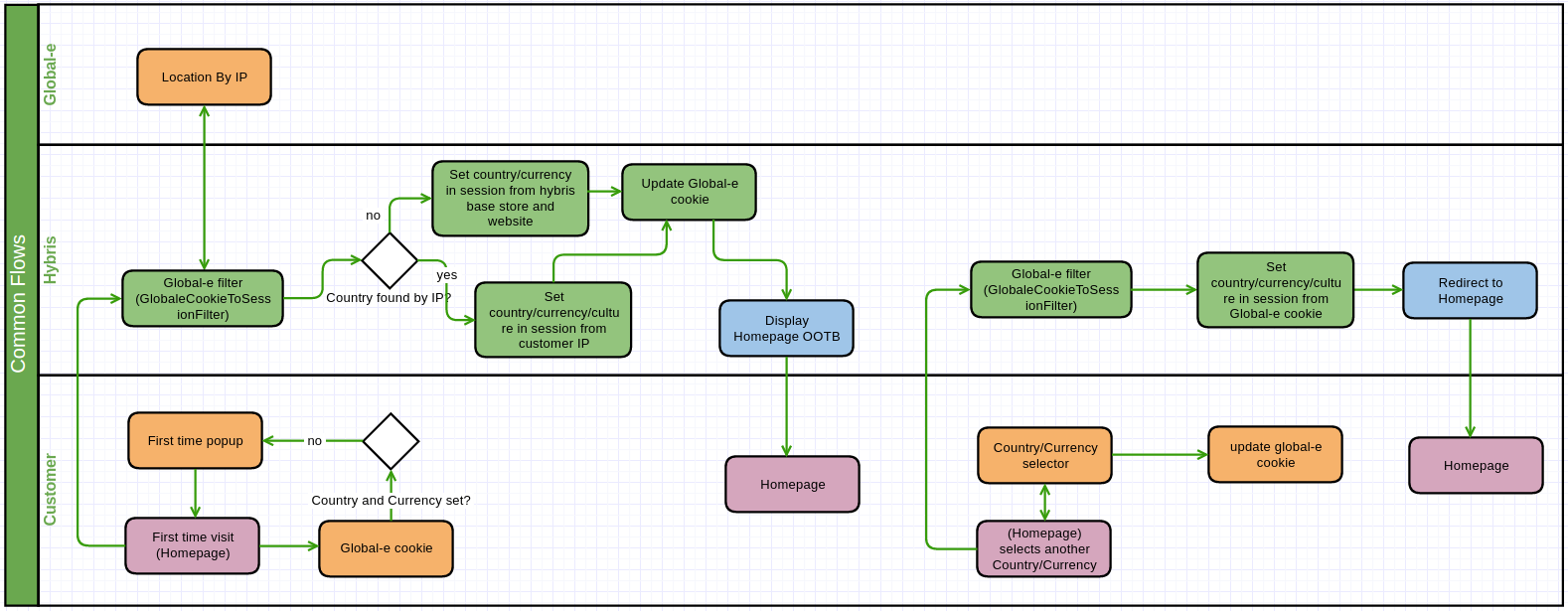
- The country and currency selector, even if it does not manage the country.
- A “first-time” popup for the customer, if Global‑e cannot find an existing cookie. Cookies are managed by Global‑e by injecting JavaScript. For this feature to work, the customer must have cookies enabled when browsing the site.
- GlobalESessionCountryISOCode = the current site’s default ship-to-country
- Global Session Currency ISO Code = the current base store’s default currency
- GlobalESessionCultureCode = not set (not mandatory)

- The Global‑e cookie is updated with the new country or currency.
- The custom GlobaleCookieToSessionFilter updates the SCC session parameters that are used when calculating price conversions.