

Overview
Customers with a gift card can use the card to pay for their purchases just as they would use other payment methods. During Checkout, customers have the option to provide their gift card details and have their payment deducted from the total on the card. To offer your customers the option to purchase and pay with gift cards, ask your Project Manager to add Gift Cards to your store.Gift Card Validation Flow
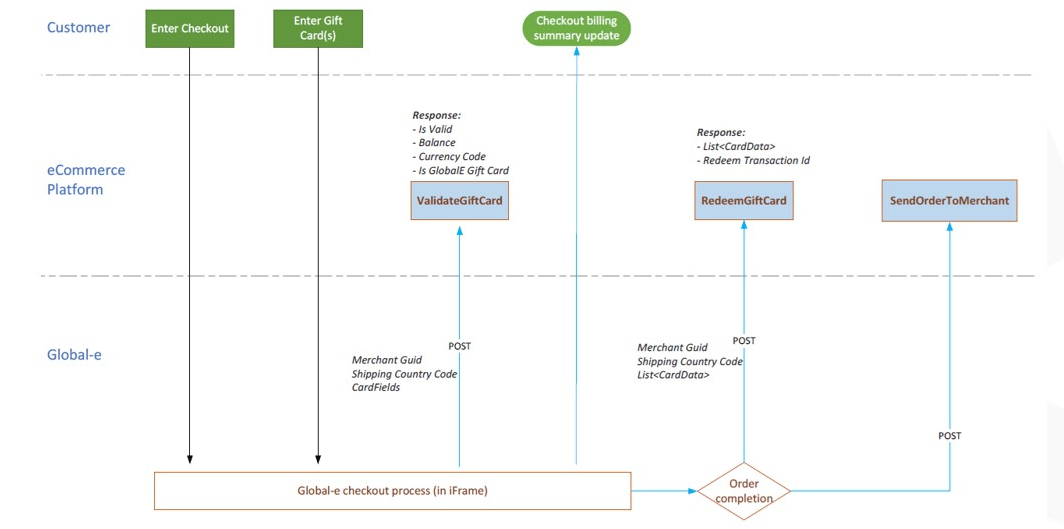
Purchasing Gift Cards
Gift cards can be purchased from the Global-e Checkout as either a virtual or physical good. Important information about gift cards:- The gift card purchase price is displayed in the customer’s currency.
- The gift card price is set according to the daily currency rate unless the price is fixed.
- The value of the gift card remains the same and is not affected by currency rate changes.
- The gift card is included when calculating flat rates but not included when calculating D&T.
- When purchased as a physical product, the gift card should exist in the Merchant manifest.
- When purchased as a virtual product, the gift card is not included when calculating shipping taxes (CIF).
Paying with a Gift Card
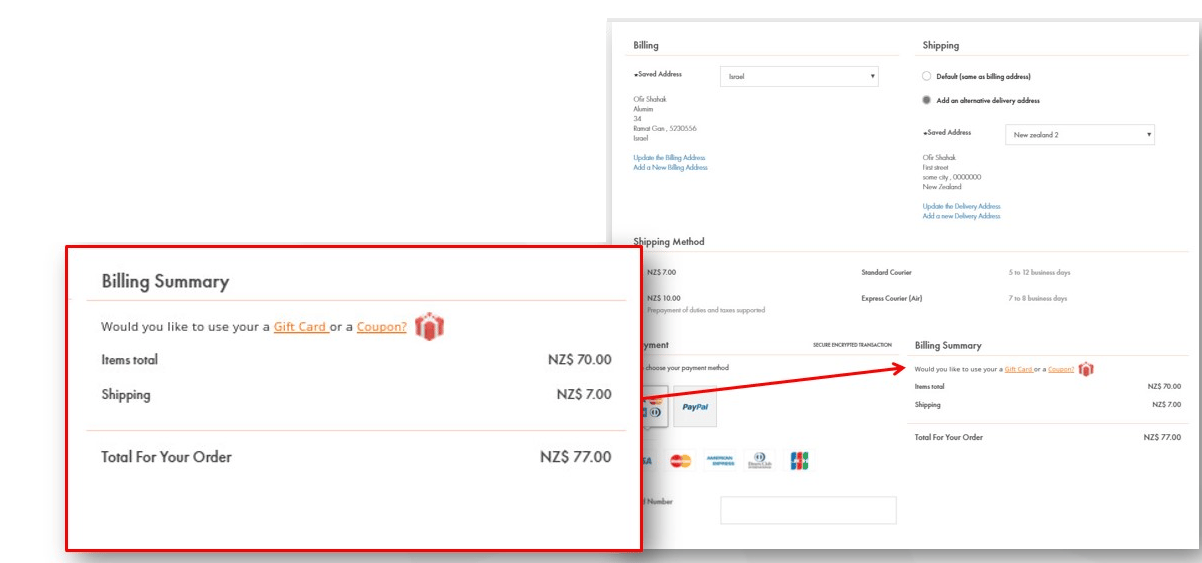
Customers can redeem gift cards on the checkout page, whether purchased from Global-e or external vendors. Gift cards can be used to purchase goods as well as to pay for shipping, duties, and taxes. They can also be used for purchases in a different currency than the one used to purchase the card. For a Global-e gift card, the exchange rate from the purchase date is used. For a non-Global-e gift card, the daily exchange rate is applied. To use a gift card in Checkout:- In Billing Summary click Gift Card.
- Fill in the required fields.
- Click save.
Returning a Gift Card
A physical gift card can be returned, but a virtual gift card cannot. A customer attempting to return a virtual gift card will not find the gift card displayed in the return portal.Refunding Gift Card Purchases
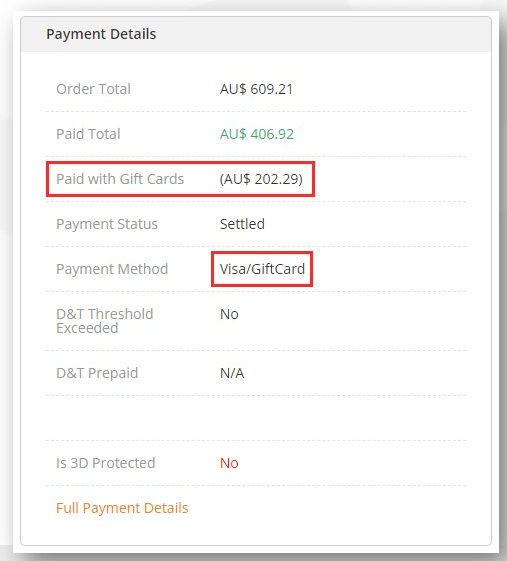
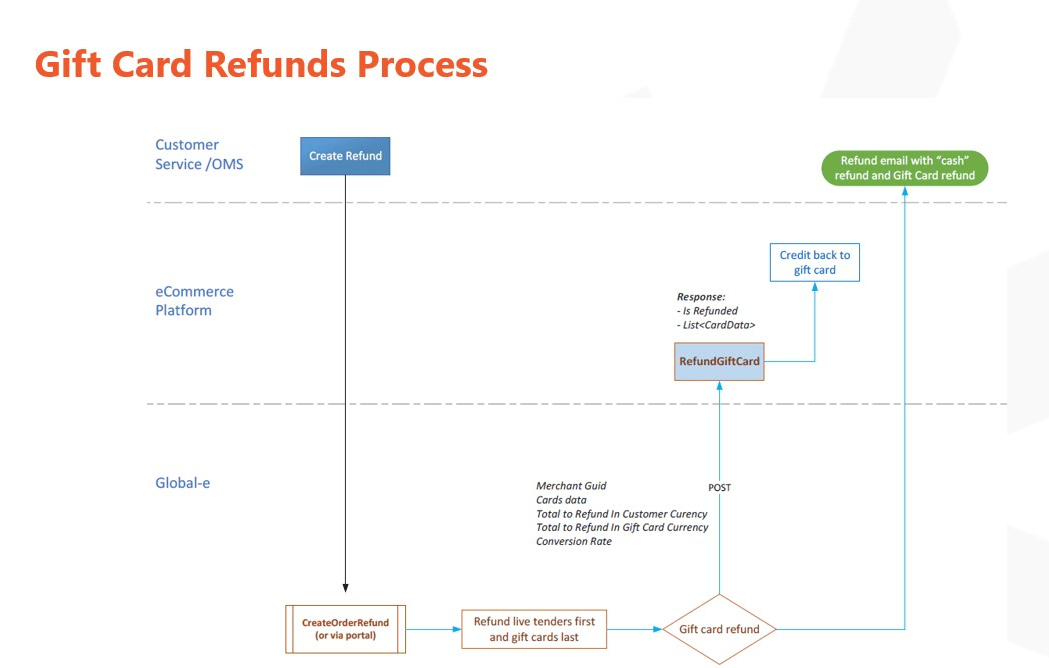
Refunds for orders purchased with a gift card are processed in the same way as other orders. If an order is paid for with both a gift card and a credit card then the credit card is refunded first, and then the gift card. Merchants are notified by API as well as in the reconciliation report about the gift card refund. The refund email also includes a note about money refunded from a gift card purchase. When performing a refund, products are refunded first, then shipping, service gesture and D&T.For the reconciliation report, it is necessary to know which products are refunded with money and which with gift cards. The NotifyOrderRefund API reflects the gift card part in the refund as well. A refund of 0 value is created when the order is purchased with a gift card as well. In cases in which a refund is not possible, the process used for COD, where the customer’s Paypal account is used for refunds, is taken.
Gift Cards on the Invoice
In a commercial invoice:- Neither physical or virtual gift cards are included in a commercial invoice.
- If an order only includes the physical gift card, the shipment is sent as documents.
- For a virtual gift card, the Invoice total amount does not match the order total.
- Both physical and virtual gift cards are included.
- The real product price is shown.
- No VAT is charged for the product.
API Calls to Platforms
Three API calls are set up with platforms to handle the gift cards:- Validate — validates the card’s authenticity and balance.
- Redeem — sent once the order is confirmed and will redeem the card’s balance.
- Release — releases the card’s balance and refunds it on order cancellations and refunds.
These three calls are sent by Global-e to the merchant’s platform — the platform implements and hosts the endpoints. Most calls use the shared
CardData base model. The full request/response contract for each is rendered on its reference page below.Validate gift card
Validate the card’s authenticity and balance.
Redeem gift card
Redeem the card’s balance once the order is confirmed.
Refund gift card
Return the used balance on cancellation or refund.
RefundedBalanceInGiftCardCurrency— make sure it is lower than the provided value ofBalanceUsedInCardCurrency.RefundedBalanceInCustomerCurrency— make sure it is lower than the provided value ofBalanceUsedInCustomerCurrency.IsRefundSuccess— set totrueif the two previous values are set on the card and the values are successfully refunded; if a refund is added but something went wrong, set tofalse. If you are not adding any refunds for a particular card, do not set these values.
Use Cases
Refund multiple cards
Request to refund every applied card on an order. The platform determines the refund value per card and returns the sameCards list with the refunded amounts and IsRefundSuccess set per card.
Refund only one card of a multiple-card order
When only some cards are refunded, leaveRefundedBalanceInGiftCardCurrency, RefundedBalanceInCustomerCurrency, and IsRefundSuccess unset (null) for the cards that are not refunded.
Changes in Existing Methods
SendOrderToMerchant — theSendOrderToMerchant call is used to pass all card information. A new property GiftCards (List<CardData>) is added in the BaseOrder model at the same level as InternationalDetails. The platform checks that each CardData.RedeemTransactionId is not empty. See the example in SendOrderToMerchantWithGiftCards.json. In cases where a platform has its own Send Cart Call, like some Pro merchants, the same changes should be implemented in the platform’s Send Cart Call.
SendCart — when a gift card is purchased using Global-e checkout, a new field should be passed as part of the Product model: bool IsGiftCart — a flag that indicates that a product is a Gift Card.
Models for all calls are described in CORE API calls models.cs (C#).